
Forza Horizon 5 System Requirements
The current Forza Horizon 5 system requirements on Steam list an Intel Core i5-4460 or AMD Ryzen 3 1200, a GeForce GTX 970, Radeon RX 470, or Intel Arc A380, and 8 GB of RAM as the minimum. The recommended specification increases this to a Core i5-8400 or Ryzen 5 1500X, a GTX 1070, RX 590, or Arc A750, and 16 GB of RAM. Both tiers require 64-bit Windows 10 version 18362.0 or later, DirectX 12, a broadband connection, and 110 GB of available storage.
Forza Horizon 5 can launch on an older gaming PC, but meeting the minimum specifications does not guarantee smooth 60 FPS performance. A system may pass the hardware check and still struggle at 1080p because of limited VRAM, insufficient available memory, thermal throttling, or settings that exceed the graphics card’s capabilities. The CPU, GPU, RAM, VRAM, storage, and operating system must therefore be assessed together.
Official Forza Horizon 5 PC System Requirements
Forza Horizon 5 has minimum and recommended specifications on its current Steam listing, while Playground Games also published an ideal configuration before the game’s 2021 release. The ideal tier remains useful for comparing higher-end systems, but it should not be mistaken for a newly tested 2026 hardware recommendation.
| Component | Minimum | Recommended | Ideal |
|---|---|---|---|
| Operating system | 64-bit Windows 10 version 18362.0 or later | 64-bit Windows 10 version 18362.0 or later | 64-bit Windows 10 |
| Processor | Intel Core i5-4460 or AMD Ryzen 3 1200 | Intel Core i5-8400 or AMD Ryzen 5 1500X | Intel Core i7-10700K or AMD Ryzen 7 3800XT |
| Graphics card | GeForce GTX 970, Radeon RX 470, or Intel Arc A380 | GeForce GTX 1070, Radeon RX 590, or Intel Arc A750 | GeForce RTX 3080 or Radeon RX 6800 XT |
| VRAM | 4 GB on GTX 970/RX 470; 6 GB on Arc A380 | 8 GB | 10 GB on RTX 3080; 16 GB on RX 6800 XT |
| System memory | 8 GB RAM | 16 GB RAM | 16 GB RAM |
| DirectX | DirectX 12 | DirectX 12 | DirectX 12 |
| Storage | 110 GB available space | 110 GB available space | 110 GB on an SSD |
| Network | Broadband internet connection | Broadband internet connection | Broadband internet connection |
Forza Horizon 5 Minimum Requirements
The minimum tier combines processors released in 2014 and 2017 with graphics cards from the same general period. This makes Forza Horizon 5 accessible to older gaming PCs, but the hardware has limited room for high resolutions, demanding texture settings, ray tracing, or heavy background activity.
The GTX 970 and RX 470 represent a 4 GB VRAM baseline. That capacity can handle the game with restrained settings, but higher environment texture quality may exceed the available memory at 1440p or 4K. The 8 GB system-memory requirement creates another constraint because Windows, launchers, monitoring software, and other applications consume part of that capacity before the game starts.
Forza Horizon 5 Recommended Requirements
The recommended tier raises system memory to 16 GB and moves to graphics cards with 8 GB of VRAM. This provides a more practical foundation for 1080p because the game has more memory available for detailed textures, world assets, and background processes.
The Core i5-8400 and Ryzen 5 1500X also offer more processing resources than the minimum CPUs. They are better suited to maintaining consistent performance when the game is handling traffic, physics, online players, and a detailed open world. However, the official listing does not attach a resolution, graphics preset, or frame-rate guarantee to this tier. High settings at 1080p are a reasonable starting point, but the built-in benchmark should determine the final configuration.
Forza Horizon 5 Ideal Requirements
Playground Games’ ideal configuration pairs a Core i7-10700K or Ryzen 7 3800XT with an RTX 3080 or RX 6800 XT. These graphics cards provide considerably more rendering power than the recommended models and are better suited to higher resolutions, demanding presets, and advanced reflection settings.
The two ideal graphics cards do not have the same memory capacity. The RTX 3080 named in the specification has 10 GB of VRAM, while the RX 6800 XT has 16 GB. This distinction matters when comparing texture limits and memory use at 4K. The ideal tier also changes the storage recommendation from a hard drive to an SSD, reducing loading times and giving the game faster access to installed assets.
Which Requirements Should You Trust?
Use the current Steam listing for the active minimum and recommended requirements. It includes the Intel Arc A380 and Arc A750, which were added after the original Nvidia and AMD specification table. The listing was checked on 11 August 2026 and still required Windows 10 version 18362.0 or later, DirectX 12, and 110 GB of available storage.
Use the official Forza Horizon 5 PC specifications for the original ideal tier and platform-specific installation details. Pages that still list Windows 10 version 15063.0 or omit Intel Arc hardware are relying on older information. The official 110 GB figure should also be treated as the stated available-space requirement rather than a guaranteed current installation size, since updates and optional content can change the space used on an individual system.
Expected Forza Horizon 5 Performance by Resolution
Resolution directly changes the number of pixels the graphics card must process for every rendered frame. Moving from 1080p to 1440p increases the pixel workload by about 78%, while native 4K contains four times as many pixels as 1080p. Graphics settings, ray tracing, and anti-aliasing add further work on top of that base resolution.
| Resolution | Pixels per frame | Hardware starting point | Initial settings | Likely constraint |
|---|---|---|---|---|
| 1920 × 1080 | 2.07 million | Minimum for conservative settings; recommended for higher quality | Low–Medium on minimum; High on recommended | GPU, 4 GB VRAM, or CPU at high frame rates |
| 2560 × 1440 | 3.69 million | Recommended tier or better | High or mixed High/Ultra | GPU performance and VRAM |
| 3840 × 2160 | 8.29 million | Ideal tier or comparable modern GPU | High–Ultra; test ray tracing separately | GPU, VRAM, and memory bandwidth |
These are starting configurations rather than promised results. Minimum-tier hardware should first be tested against a stable 30 FPS target. Recommended or stronger hardware can be tested at 60 FPS, followed by higher targets when sufficient CPU and GPU headroom remains.
Forza Horizon 5 at 1080p
At 1080p, the minimum GPUs have the best chance of delivering playable performance because they process fewer pixels than at 1440p or 4K. Start with ray tracing disabled and use a Low or Medium preset before increasing individual settings. Environment texture quality deserves close attention on the GTX 970 and RX 470 because both represent the original 4 GB VRAM baseline.
The recommended GPUs are better suited to a High starting preset at 1080p. Their greater processing power and 8 GB memory capacity allow more detailed textures and geometry without the same memory pressure. Ultra and Extreme options should still be tested individually because they can add a noticeable performance cost for smaller visual gains.
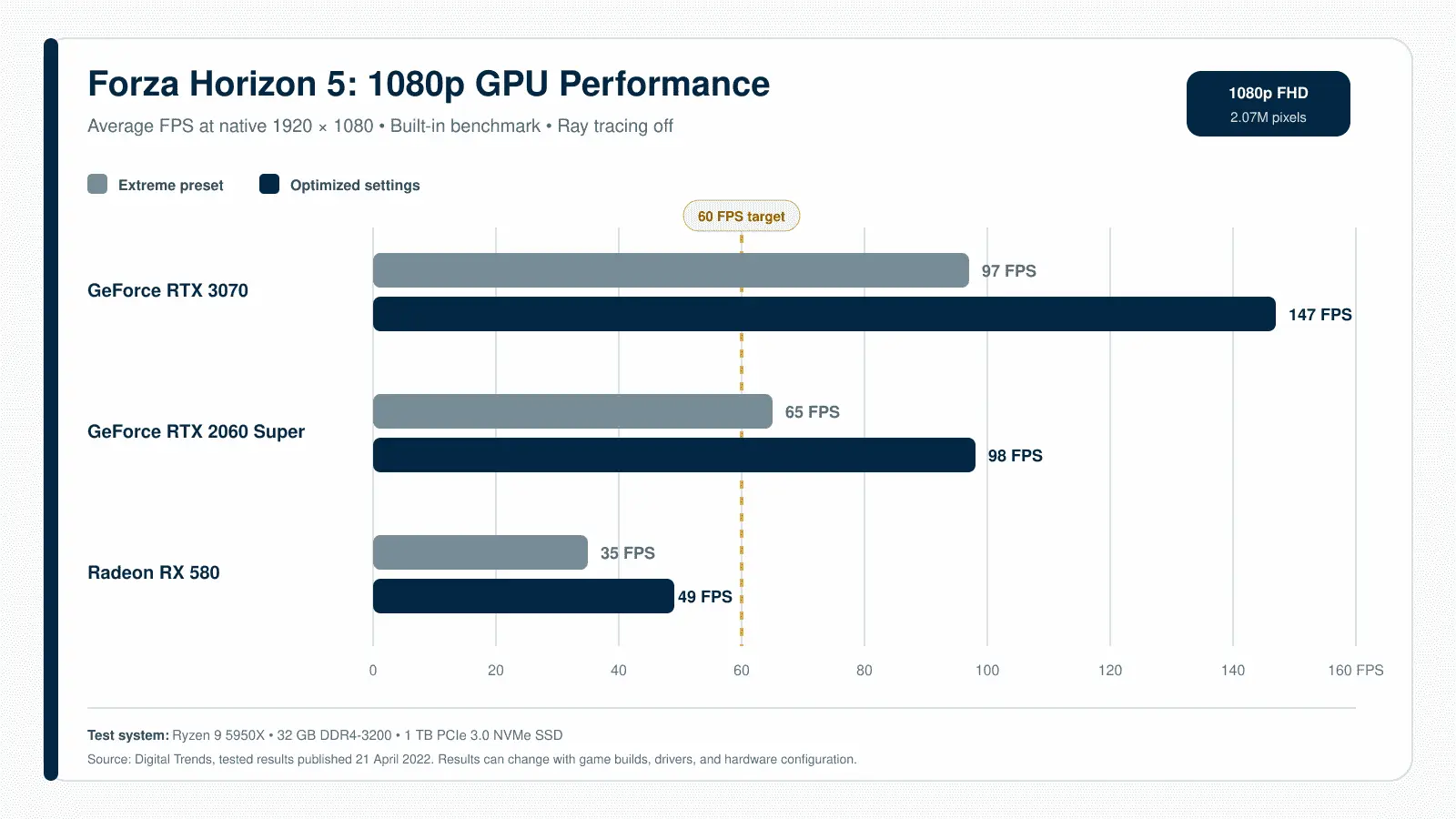
The processor becomes more visible when the graphics card can render frames quickly. A system targeting 120 FPS must prepare twice as many conventional frames per second as a 60 FPS system. Traffic, physics, world simulation, and draw calls can therefore limit performance even when the GPU is not fully occupied.
Forza Horizon 5 at 1440p
A 2560 × 1440 image contains 3,686,400 pixels, compared with 2,073,600 at 1080p. This 78% increase shifts more work to the graphics card and reduces the frame-rate headroom available for Ultra settings, high levels of anti-aliasing, or ray-traced reflections.
Recommended-tier hardware should begin with the High preset rather than assuming the same settings used at 1080p will maintain the same frame rate. Environment textures can remain high when sufficient VRAM is available, while shadows, reflections, geometry, and MSAA can be adjusted to recover performance.
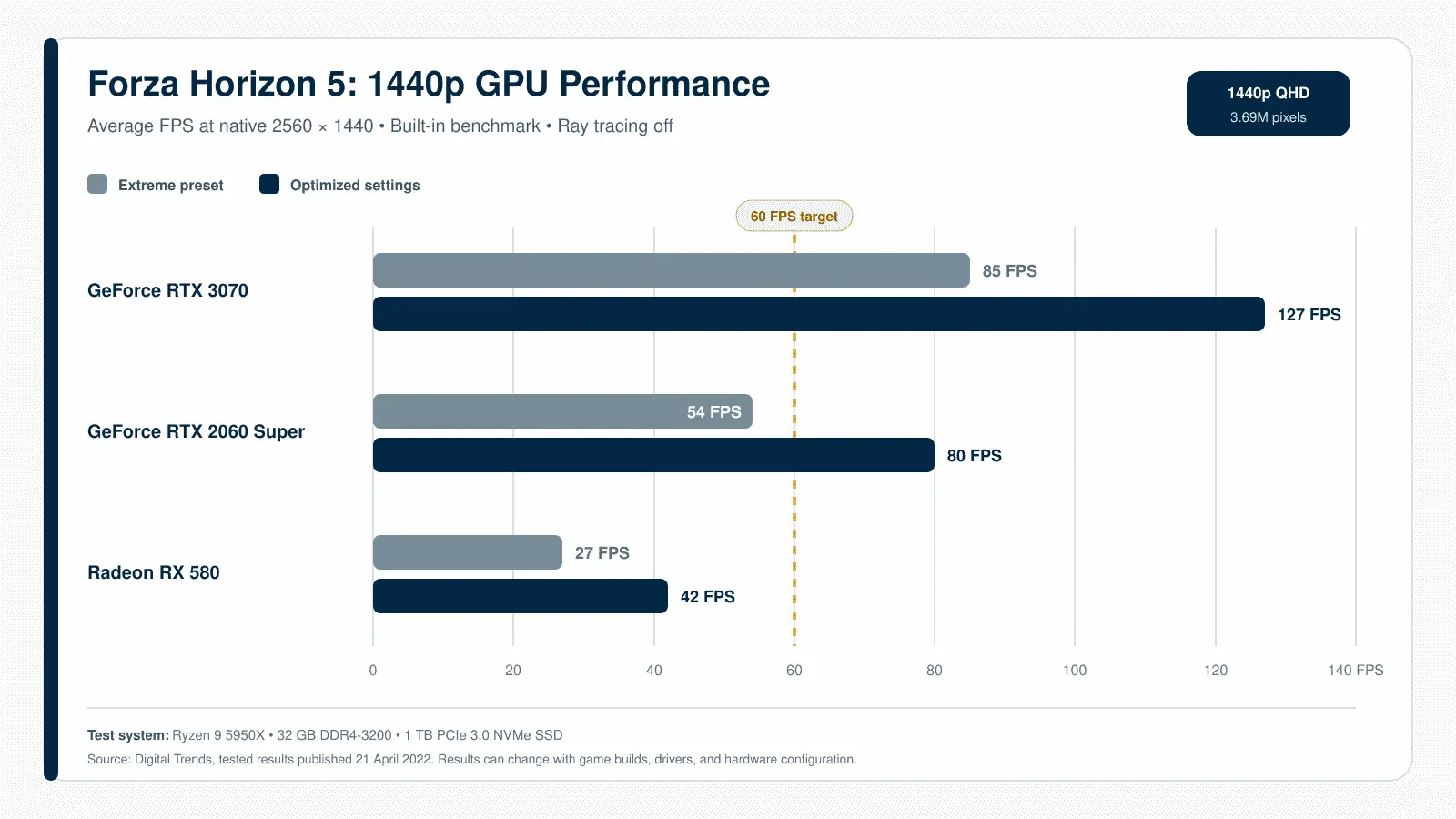
Quality-mode DLSS or FSR can be useful when native 1440p falls slightly below the target. These methods render fewer internal pixels and reconstruct the image at the selected output resolution. They should be compared with native rendering during movement because fine vegetation, distant objects, car edges, and overhead cables can reveal reconstruction artefacts that are less visible in static screenshots.
Forza Horizon 5 at 4K
Native 4K requires the graphics card to process 8,294,400 pixels per frame. That is four times the 1080p workload and 2.25 times the 1440p workload before graphics settings or ray tracing are considered. The ideal specification is therefore a more suitable reference point than the minimum or recommended tiers.
The RTX 3080 and RX 6800 XT named in the ideal tier have enough rendering power for demanding configurations, but their different VRAM capacities can produce different limits. The RTX 3080 specification includes 10 GB, while the RX 6800 XT includes 16 GB. Texture quality, ray tracing, resolution, and background memory use determine whether that difference affects a particular configuration.
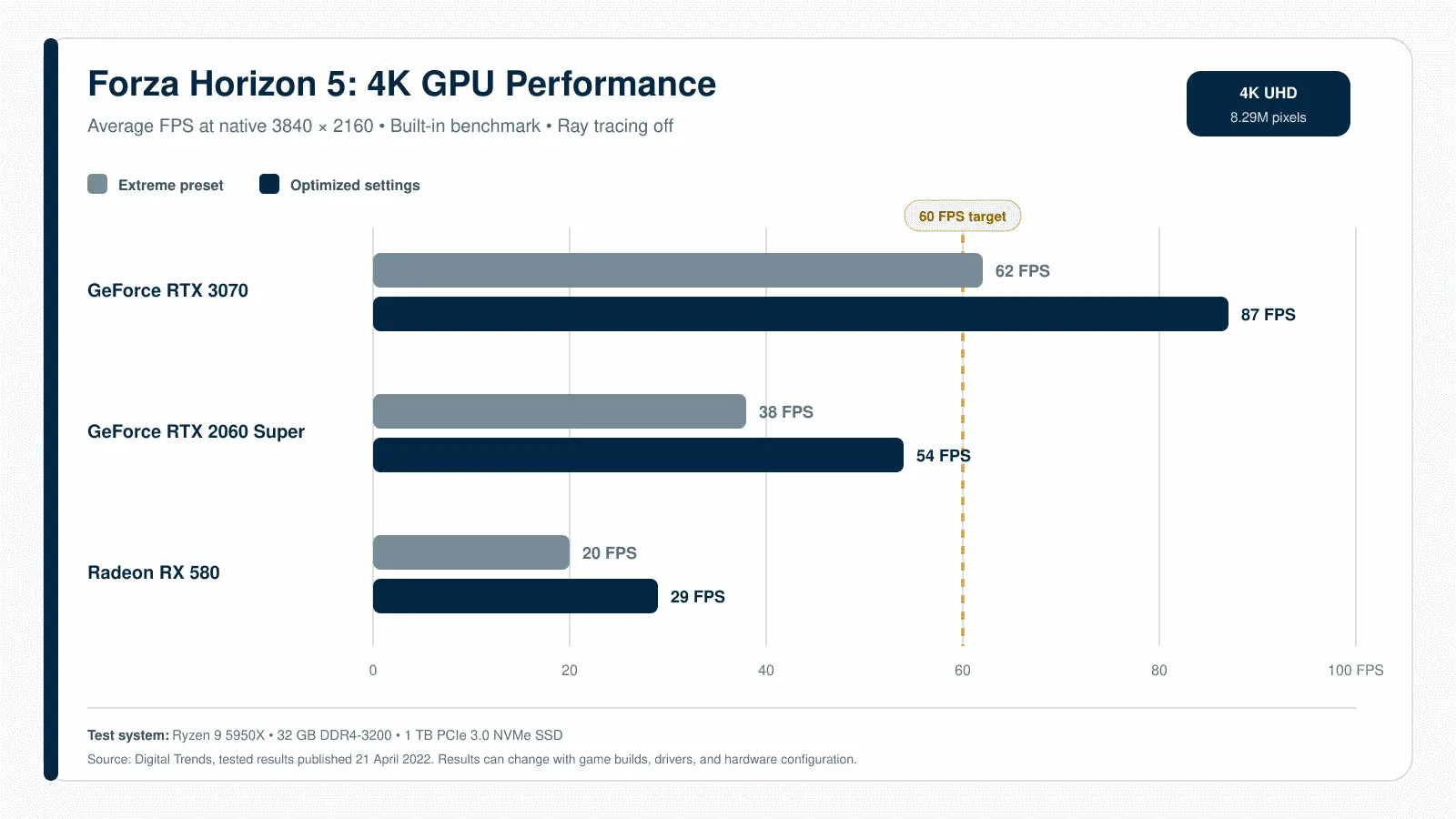
The following independent benchmark uses different GPUs from the official ideal specification, but it demonstrates how graphics-setting adjustments affect native 4K performance. A 4K output is not always native 4K rendering. DLSS or FSR can reconstruct a 4K image from a lower internal resolution, reducing GPU work while retaining the display’s output resolution. Ray tracing should be tested separately because enabling Ultra or Extreme reflections changes both performance demand and memory use.
Why Do Benchmark Results Differ?
A benchmark result is meaningful only when its conditions are known. GPU model alone is insufficient because the processor, system memory, driver version, game build, resolution, preset, ray-tracing mode, upscaling mode, and laptop power limit can all change the outcome.
Launch-period tests also predate later additions such as DLSS, FSR 2.2, expanded ray-traced reflections, and DLSS Frame Generation. Their native rendering data can provide historical context, but it should not be mixed with results produced on later game versions or different graphics features.
The built-in benchmark provides a repeatable comparison, but it cannot represent every open-world condition. A complete check should include the benchmark and a separate drive through a demanding area with traffic, weather, and rapid movement. Record the average frame rate, minimum frame rate, GPU utilisation, VRAM use, and visible stutter under the same settings before making comparisons.
CPU, RAM, and VRAM
The processor, system memory, and video memory affect different parts of Forza Horizon 5. A low frame rate caused by the GPU will not necessarily improve after adding system RAM, while reducing texture quality may not solve a processor bottleneck. Identifying the constrained component prevents unnecessary settings changes and hardware upgrades.
CPU Performance
The CPU prepares the work that the graphics card renders. In Forza Horizon 5, this includes traffic behaviour, vehicle physics, world simulation, input processing, asset requests, and draw calls. The workload becomes more demanding when targeting high frame rates because the processor must prepare each frame more quickly.
A CPU bottleneck can appear when the graphics card remains below full utilisation while the frame rate refuses to increase. Lowering the resolution may produce little improvement because resolution mainly changes GPU workload. Performance can also fall in busy locations or races with more vehicles, even if quieter parts of the map run smoothly.
Core count is only one part of processor performance. Architecture, instructions completed per clock, operating frequency, cache, memory latency, and thermal behaviour also matter. A newer processor with fewer cores can outperform an older model with a higher core count, so model names should be compared through game performance rather than specification totals alone.
CPU-heavy graphics options include environment geometry, world-car level of detail, and settings that increase the number or distance of objects prepared for rendering. Reducing texture quality usually provides little benefit to a CPU-limited system because textures place more pressure on the GPU and VRAM.
Is 8 GB RAM Enough?
Forza Horizon 5 officially supports 8 GB of system RAM, but this figure includes no allowance for the amount already used by Windows and background software. A browser with several tabs, a game launcher, voice chat, recording software, RGB utilities, and monitoring overlays can consume a meaningful share of the available memory.
When physical RAM becomes full, Windows moves less-active data to the page file on the storage drive. This process is much slower than accessing RAM and can cause delayed asset loading or uneven frame times. An SSD reduces the penalty compared with a hard drive, but it does not replace sufficient memory.
Upgrading from 8 GB to 16 GB may improve consistency more than the average frame rate. The benefit is most visible when the original system was running close to its memory limit. Moving from 16 GB to 32 GB is less likely to change Forza Horizon 5 performance when the game and background applications already fit comfortably within 16 GB.
Memory configuration also matters. Two matched modules operating in dual-channel mode provide more bandwidth than a comparable single-module setup. The difference is more important for integrated graphics because the GPU shares system memory instead of using dedicated VRAM.
How Much VRAM Do You Need?
VRAM is memory located on or assigned to the graphics processor. It stores textures, geometry data, frame buffers, shadow maps, reflection data, and other resources needed to produce the image. It is separate from normal system RAM, although integrated graphics borrow part of the system memory for graphics use.
| VRAM capacity | Sensible starting use | Main limitation |
|---|---|---|
| 4 GB | 1080p with restrained textures, geometry, and reflections | Limited headroom for ray tracing, detailed textures, and higher resolutions |
| 6–8 GB | 1080p High or a customised 1440p configuration | Demanding settings may exceed the available capacity |
| 10 GB or more | Higher resolutions, detailed textures, and advanced reflections | More VRAM does not guarantee sufficient GPU processing performance |
The 4 GB figure represents the original minimum Nvidia and AMD graphics cards. It does not mean every 4 GB GPU meets the minimum performance level. A card can have enough memory but lack the processing power, memory bandwidth, or DirectX support required by the game.
Exceeding available VRAM may cause texture warnings, delayed texture loading, sharp frame-time spikes, or repeated transfers between system RAM and video memory. These symptoms can resemble a slow storage drive or insufficient system RAM, so VRAM use should be checked alongside GPU utilisation and frame-time data.
Environment texture quality should be reduced first when the game reports excessive video-memory use. Ray tracing, resolution, MSAA, geometry detail, and reflection quality can also increase memory demand. Lowering output or internal rendering resolution reduces the memory used by render targets, but it may not reduce texture allocation as much as lowering the texture setting itself.
More VRAM is useful only when the graphics processor can use it effectively. A slower 12 GB card does not automatically outperform a faster 8 GB card. Capacity determines how much graphics data can remain available, while GPU processing power determines how quickly that data can be rendered.
Storage, Windows, and Internet
How Much Storage Is Required?
Forza Horizon 5 requires 110 GB of available storage on PC. This figure should be treated as the official space requirement rather than an exact prediction of the final installed size. The space used on an individual system can change after game updates, language files, expansions, and optional content are installed.
Download size and installed size are also different measurements. Storefront compression can reduce the amount of data transferred, while the extracted installation occupies more space. An update may temporarily require additional working space because the launcher must download new files, verify existing data, and replace older packages.
Installing the game with exactly 110 GB free leaves little room for future updates or normal drive maintenance. Windows and SSDs operate more comfortably when some capacity remains unused, so additional headroom is preferable. The required margin cannot be expressed as one permanent number because update sizes and installed content vary.
Do You Need an SSD?
An SSD is not listed as mandatory in the current minimum or recommended requirements. The original ideal specification recommends one, which reflects its benefit for loading and data access rather than a strict launch requirement.
Compared with a hard drive, an SSD can reduce startup time, loading screens, fast-travel delays, installation time, and update processing. It can also retrieve game assets more quickly when the open world requests new data. A slow or heavily fragmented hard drive may take longer to deliver those assets, although storage is not the only possible cause of texture pop-in or stutter.
Moving from a hard drive to an SSD should not be treated as a substitute for an inadequate CPU or GPU. Storage speed can improve responsiveness and loading behaviour, but average rendering performance remains primarily dependent on the processor and graphics card. An SSD upgrade makes the most sense when loading is slow, disk activity remains high, or other components already meet the required level.
Drive Format Matters
Players installing the Xbox app or Microsoft Store version on Windows 10 or Windows 11 must use an NTFS-formatted drive. According to the official Forza PC specifications, installation to an exFAT drive will not work for these versions. The same restriction does not apply to the Steam release.
The file system can be checked in File Explorer by opening This PC, right-clicking the intended drive, and selecting Properties. The format appears next to File system. Reformatting a drive erases its existing contents, so personal files must be backed up before any conversion or formatting process is attempted.
Windows and DirectX 12
Forza Horizon 5 requires a 64-bit operating system and officially lists Windows 10 version 18362.0 or later. Windows 11 is also supported. A system running an older Windows build should be updated before installation because meeting the hardware requirements does not override the operating-system requirement.
DirectX 12 is mandatory, but seeing “DirectX 12” in the DirectX Diagnostic Tool does not prove that the graphics card is powerful enough. DirectX compatibility confirms access to the required graphics API; it does not measure rendering speed, VRAM capacity, or driver quality.
Graphics drivers should support the installed GPU and current Windows version. A driver that predates the game or a major graphics update can cause crashes, missing options, visual errors, or reduced performance. Laptop owners may need to compare the GPU manufacturer’s driver with the version supplied by the laptop manufacturer, as the latter can include system-specific power and display controls.
Accounts and Connectivity
The PC requirements list a broadband internet connection, and the current Steam listing states that a persistent internet connection is required. Online races, Horizon Open, shared creations, seasonal activities, and other connected features depend on access to Forza services.
The Steam version also requires a Microsoft account. This account is linked when the game is launched through Steam and is used for Xbox services and cross-platform play. Purchasing the game on Steam does not remove the Microsoft sign-in requirement.
Cross-play and cross-save are separate features. Steam players can race with players on other supported platforms, but Steam progress is stored separately from progress associated with the Xbox console or Windows Store version. A player moving between these storefronts should not expect campaign progress, owned items, or user-generated content to transfer automatically.
Best Settings for More FPS
The most effective graphics configuration depends on the limiting component. A GPU-bound system benefits from lower resolution, ray tracing, shadows, reflections, and anti-aliasing, while a CPU-limited system responds better to reduced geometry and object-detail settings. Lowering every option at once makes it difficult to identify which change produced the improvement.
Start With the Built-In Benchmark
Forza Horizon 5 includes a built-in benchmark that applies a repeatable workload and reports performance under the selected graphics configuration. It should be used as a controlled starting point before testing normal gameplay.
- Allow the Optimizing for Your PC process to finish. This prepares shaders for the installed hardware and reduces compilation work during gameplay.
- Select the monitor’s native resolution and confirm the correct refresh rate. Disable ray tracing, Frame Generation, and dynamic resolution for the first baseline run.
- Choose a suitable preset. Minimum-tier systems should begin with Low or Medium, recommended hardware with High, and ideal-tier hardware with High or Ultra.
- Run the benchmark twice without changing the configuration. The first pass can include additional caching or background activity, while the second provides a more useful comparison point.
- Record the average FPS, minimum FPS, GPU utilisation, reported VRAM use, and any warning about graphics memory. Note visible stutter even when the average result appears acceptable.
- Set a realistic performance target. A stable 60 FPS is preferable to an average above 60 that repeatedly falls into the 30s or 40s.
- Change one setting, repeat the benchmark, and compare the result with the baseline. Keep the change only when the performance gain justifies the visual loss.
The benchmark should be followed by an open-world drive through a dense location with traffic, weather, and rapid camera movement. A controlled benchmark shows comparative performance, but it cannot reproduce every gameplay condition.
Lower These Settings First
Ray tracing should be disabled first when additional performance is needed. Ultra and Extreme ray-tracing modes extend reflections beyond Forzavista into races and Free Roam, increasing GPU and VRAM demand. The visual improvement is concentrated on vehicles and reflections rather than the entire lighting system.
Shadow quality and night shadows are useful next adjustments. High-resolution shadows require additional rendering work, while night shadows matter only during darker conditions. Disabling night shadows can recover performance without changing daytime image quality.
MSAA renders extra coverage samples to smooth geometric edges. Higher levels increase GPU and memory-bandwidth use, so reducing MSAA can provide a better trade-off than lowering texture quality. It should not be combined with another demanding anti-aliasing method unless the visual benefit is clear.
Reflection quality and screen-space reflections affect vehicles, wet roads, water, and other reflective surfaces. These settings are visible during normal driving, but their highest levels are not necessary for a clean image. Moving them down one level can reduce GPU load while preserving most of the intended appearance.
Environment geometry and world-car level of detail control the complexity and visible distance of objects. These options can affect both CPU and GPU performance because the processor must prepare more objects while the graphics card renders them. They are useful adjustments when performance falls in dense areas or races with several vehicles.
Deformable terrain and particle effects become more demanding during off-road driving, dust, debris, and weather effects. Lowering them can improve consistency in those conditions without changing the appearance of roads, cars, or buildings throughout the rest of the game.
Environment texture quality should be reduced when VRAM is close to capacity or the game reports a memory warning. Lowering textures on a card with sufficient VRAM may produce little FPS improvement while making surfaces visibly less detailed.
Protect Image Quality
Anisotropic filtering keeps road surfaces and textures clearer when viewed at an angle. Its cost is generally modest on supported GPUs, so it should remain at a reasonably high level unless testing shows a measurable problem.
Texture quality should also remain as high as the available VRAM allows. A balanced configuration usually looks better with detailed textures and slightly lower shadows or reflections than with low-resolution textures and maximum secondary effects.
The High preset is a stronger foundation than reducing the entire game to Low. Individual Ultra and Extreme settings can then be added where the hardware has enough headroom. This approach retains the detail that remains visible during driving while avoiding costly options with limited visual effect.
Motion blur, lens effects, and depth-related camera effects are preference-based settings. Disabling them may improve clarity, but they should not be presented as major performance fixes unless a benchmark shows a meaningful difference on the tested system.
A frame-rate cap can improve consistency when performance fluctuates around a target. For example, a system moving repeatedly between 55 and 75 FPS may feel smoother when capped at a level it can sustain. Variable-refresh-rate displays can reduce visible tearing, but they cannot correct severe frame-time spikes caused by CPU, memory, or storage limitations.
DLSS, FSR, and Ray Tracing
Forza Horizon 5 supports native rendering, temporal upscaling, native-resolution anti-aliasing, ray-traced car reflections, and Nvidia Frame Generation. These options solve different performance or image-quality problems and should not be treated as interchangeable settings.
Native Rendering and Upscaling
Native rendering means the game produces the frame at the selected output resolution. At native 2560 × 1440, for example, the graphics card renders approximately 3.69 million pixels before the image is displayed. Native rendering avoids reconstruction artefacts but requires more GPU work than rendering internally at a lower resolution.
Temporal upscaling uses information from the current frame, previous frames, motion vectors, and other game data to reconstruct a higher-resolution output. A 4K display can therefore receive a 4K output image even though the game rendered fewer than 8.29 million pixels internally.
The performance benefit increases as the internal resolution falls, but image quality becomes more difficult to preserve. Fine vegetation, fences, cables, car details, and fast-moving objects can show instability, ghosting, or lost detail. Quality mode is normally the strongest starting point, while Balanced or Performance modes become more useful when the output resolution is high and the GPU needs a larger reduction in workload.
Upscaling should not be confused with anti-aliasing. Anti-aliasing smooths jagged edges, while upscaling lowers the internal rendering workload and reconstructs the final image. Some technologies perform both functions, but their performance and image-quality goals remain distinct.
DLSS Super Resolution and DLAA
Nvidia DLSS Super Resolution is available on GeForce RTX graphics cards. It uses RTX Tensor Cores and game data to reconstruct the selected output resolution from a lower internal resolution. It is most useful when the GPU is the performance limit at 1440p or 4K.
Quality mode retains a higher internal resolution and should be tested first. Balanced mode reduces the internal resolution further, while Performance mode prioritises frame rate. Performance mode is more suitable for a 4K output than 1080p because its internal pixel count becomes very low at smaller output resolutions.
DLAA uses the same AI-based technology for anti-aliasing but keeps the image at native resolution. Its purpose is improved edge quality rather than higher FPS. It is therefore better suited to systems that already meet their performance target and have GPU capacity available for cleaner image presentation.
The official Forza Horizon 5 graphics update added DLSS Super Resolution, DLAA, FSR 2.2, and expanded ray-tracing options in November 2022. Earlier launch benchmarks do not include these rendering choices.
AMD FSR 2.2
AMD FidelityFX Super Resolution 2.2 is a temporal upscaler that works across supported AMD, Nvidia, and Intel graphics cards. Unlike DLSS, it does not require Nvidia RTX hardware. This makes it the broader option for older GPUs and systems that cannot enable DLSS.
FSR 2.2 offers multiple quality modes that change the internal rendering resolution. Quality mode preserves more image information, while Performance mode reduces GPU workload more aggressively. The correct mode depends on the output resolution, native frame rate, and amount of image instability the player considers acceptable.
At 1080p, aggressive upscaling can produce a visibly soft or unstable image because the source resolution is already limited. At 1440p, Quality mode provides a more useful balance. At 4K, Balanced and Performance modes have more output pixels available for reconstruction, although fine details should still be inspected during movement.
FSR does not solve every performance problem. It primarily reduces GPU rendering work. A system limited by its CPU, insufficient RAM, background activity, or thermal throttling may show little improvement after lowering the internal resolution.
DLSS Frame Generation
DLSS Frame Generation creates an additional frame between conventionally rendered frames. Forza Horizon 5 received native DLSS 3 support in March 2023, making Frame Generation available on supported GeForce RTX 40-series and newer graphics cards. Nvidia Reflex is used alongside it to reduce rendering-pipeline latency. Nvidia documented the feature in its Forza Horizon 5 DLSS 3 release.
Generated frames can make motion appear smoother and raise the displayed FPS, but they do not carry newly sampled player input in the same way as conventional frames. A reported 100 FPS with Frame Generation should therefore not be interpreted as equivalent to 100 native rendered frames per second.
Frame Generation works best when the system already produces a stable base frame rate. Enabling it at a low or inconsistent native frame rate can make the FPS counter rise while steering response and frame pacing remain unsatisfactory. CPU limitations, asset-loading stalls, and insufficient memory must still be addressed at their source.
DLSS Super Resolution and Frame Generation can be used together, but their contributions should be measured separately. Super Resolution reduces the work required to render the base frames, while Frame Generation inserts additional displayed frames between them.
Ray-Tracing Presets
Forza Horizon 5 uses ray tracing primarily for vehicle reflections. Medium and High modes restrict these reflections to Forzavista, the mode used to inspect vehicles closely. They do not add ray-traced reflections throughout normal driving.
Ultra and Extreme extend ray-traced reflections to the player’s car during Free Roam and races. They also enable additional vehicle reflections in Photo Mode. The game still relies on conventional rendering methods for most world lighting, shadows, and environmental reflections, so these modes should not be described as full-scene ray tracing.
The visual benefit is most noticeable on clean, reflective bodywork and in scenes where nearby objects appear on the vehicle. During fast driving, the improvement can be harder to notice than the performance cost. Players seeking a stable frame rate should compare Ultra or Extreme ray tracing with the feature disabled under the same route, weather, camera, and graphics settings.
Ray tracing increases GPU and VRAM demand. Upscaling can recover part of the lost performance, but it also changes image reconstruction quality. The two features should be tested independently before being combined, allowing the player to determine whether the reflection improvement justifies both the rendering cost and the lower internal resolution.
Laptops and Integrated Graphics
Laptop hardware cannot be compared with desktop components by model name alone. Power limits, cooling capacity, memory configuration, battery settings, and the selected GPU can change performance even when two systems appear to have similar specifications.
Laptop GPUs Are Not Desktop Equivalents
A laptop graphics processor operates within a power limit selected by the laptop manufacturer. A higher limit allows the GPU to sustain faster clock speeds, while a lower limit reduces heat and battery use at the cost of performance. Two laptops carrying the same GPU name can therefore produce different Forza Horizon 5 results.
Cooling design creates another difference. A thin laptop may reach its temperature or power limit sooner than a larger gaming model. Performance can appear strong at the beginning of a benchmark and decline after several minutes as heat builds. A short test may therefore overstate the frame rate the laptop can sustain during a longer session.
Desktop and laptop versions must also be identified correctly when comparing hardware with the official requirements. A laptop GPU may use a different chip configuration, clock range, memory bus, or power budget from a desktop card with a related name. A mobile processor can face similar restrictions when the CPU and GPU share the same cooling system.
Performance testing should be performed with the original charger connected. Battery operation normally applies stricter CPU and GPU power limits, making the result unsuitable for judging plugged-in gaming performance. The manufacturer’s Performance or Turbo profile should also be enabled when fan noise and temperature conditions allow it.
Can Integrated Graphics Run the Game?
The official minimum requirements list dedicated graphics cards: the GTX 970, RX 470, and Arc A380. No integrated GPU is identified as an official minimum baseline. A processor with integrated graphics may still launch the game, but compatibility and performance depend on the specific graphics architecture, memory bandwidth, driver support, and available system power.
Integrated graphics do not have a conventional pool of dedicated VRAM. They reserve or borrow part of the system memory, leaving less RAM available to Windows and the game. A laptop with 8 GB of installed memory may therefore have considerably less usable system memory after the integrated GPU takes its share.
Memory bandwidth has a strong effect on integrated graphics because the CPU and GPU use the same RAM. A dual-channel configuration with two active memory channels can provide more bandwidth than a comparable single-channel setup. Faster DDR5 or LPDDR5 memory can also improve graphics performance, although the result still depends on the processor’s integrated GPU and power limit.
A practical integrated-graphics test should begin below 1080p or with a reduced internal rendering resolution. Use the Low preset, disable ray tracing, keep texture quality within the available shared memory, and test FSR only after recording native performance. A stable 30 FPS target is more realistic than assuming an integrated GPU can match the dedicated cards in the official specification.
At least 16 GB of dual-channel system memory is a more suitable configuration for integrated graphics because some capacity is reserved for graphics use. This is a practical recommendation rather than an official requirement, and it does not guarantee that the GPU portion of the processor is powerful enough.
Prevent Laptop Throttling
Thermal throttling occurs when the CPU or GPU reduces its operating speed to remain within temperature, power, or electrical limits. The resulting FPS loss may appear gradually, which is why sustained testing is more useful than checking performance immediately after launch.
- Connect the original power adapter and confirm that Windows is not using a battery-saving profile.
- Select the laptop manufacturer’s gaming, performance, or turbo mode. Balanced and silent modes often restrict sustained CPU and GPU power.
- Confirm that Forza Horizon 5 is using the dedicated GPU. Windows Graphics settings and the Nvidia or AMD control panel can assign the high-performance processor to the game.
- Place the laptop on a hard, flat surface so the intake vents remain open. Soft bedding or fabric can block airflow and raise temperatures.
- Allow the shader-optimisation process to finish before judging stutter or performance.
- Monitor GPU temperature, CPU temperature, clock speed, power use, and utilisation during a benchmark and a longer open-world drive. A falling clock speed under sustained load can indicate thermal or power limiting.
- Close unnecessary browsers, recording tools, overlays, and hardware-control applications that consume memory or processor time.
- Compare the graphics driver supplied by the laptop manufacturer with the current driver from Intel, AMD, or Nvidia. Manufacturer drivers may contain device-specific controls, while newer generic drivers may provide later game fixes.
A cooling pad can help when the laptop’s intake design benefits from additional airflow, but it cannot correct an undersized cooling system or a restricted GPU power configuration. Persistent throttling may require cleaning blocked vents, checking fan operation, or having old thermal material inspected by a qualified technician.
Test and Tune Your PC
A reliable compatibility check begins with the exact hardware models, not general labels such as “Core i7,” “8 GB graphics,” or “gaming laptop.” The processor generation, GPU version, memory configuration, operating-system build, and intended resolution all affect the result.
Find Your Specifications
- Open Settings > System > About and record the full processor name, installed RAM, system type, and Windows edition.
- Press Windows + R, enter
winver, and record the Windows version and OS build. Forza Horizon 5 requires a 64-bit Windows installation and lists Windows 10 build 18362.0 or later. - Open Task Manager > Performance > GPU and record the complete GPU name. If more than one GPU appears, identify which entry is the integrated processor and which is the dedicated graphics card.
- Check Dedicated GPU memory in Task Manager. Do not combine dedicated and shared GPU memory when comparing a graphics card with the official VRAM figures.
- Press Windows + R, enter
dxdiag, and check the DirectX version on the System tab. The Display tab also shows the active graphics device and installed driver details. - Open File Explorer > This PC and confirm that the intended drive has more than 110 GB available. Open the drive’s Properties window to check whether it uses NTFS when installing through the Xbox app or Microsoft Store.
- Laptop users should record the exact laptop model and GPU power configuration when available. The same laptop GPU can operate at different power limits in different systems.
A processor family name is not precise enough for comparison. “Core i5” can refer to models released many years apart, while “Radeon Graphics” may describe an integrated GPU rather than a dedicated Radeon card. Copy the complete names shown by Windows.
Compare the Complete System
Begin with the CPU and GPU because they perform most of the work required to simulate and render the game. Compare their actual gaming performance with the official reference models rather than relying on release year, clock speed, core count, or VRAM alone.
The graphics card must provide adequate processing power as well as memory capacity. A slow 8 GB GPU does not automatically meet the recommended level simply because the GTX 1070 and RX 590 also have 8 GB. VRAM capacity and rendering speed are separate characteristics.
The processor comparison must account for architecture and sustained performance. A newer four-core processor may outperform an older model with more cores, while a laptop CPU may run below its expected level when restricted by cooling or power settings.
RAM should be checked after Windows and normal background applications have loaded. A system with 8 GB installed may technically meet the minimum while having little memory left for the game. Integrated graphics reduce the available amount further because they borrow system memory.
The weakest relevant component defines the initial expectation. A recommended GPU paired with a below-minimum CPU remains a borderline system. The same applies to a capable CPU paired with insufficient VRAM, 8 GB of heavily occupied RAM, or an unsupported operating-system build.
Resolution and frame-rate target must be included in the comparison. Hardware that is suitable for 1080p at 30 FPS may not be suitable for 1440p at 60 FPS. A requirements check without a stated performance target can only confirm broad compatibility.
Frequently Asked Questions
Can Forza Horizon 5 Run With 8 GB RAM?
Yes. Eight gigabytes of RAM meets the official minimum requirement, but the game must share that memory with Windows and background applications. Close browsers, recording tools, launchers, and unnecessary overlays if memory use is high or frame times become inconsistent.
Sixteen gigabytes is the recommended capacity and provides a more practical margin for normal Windows use. Systems with integrated graphics benefit further because the GPU borrows part of the installed RAM.
Can a 4 GB Graphics Card Run Forza Horizon 5?
A suitable 4 GB graphics card can run the game because the GTX 970 and RX 470 represent the original minimum GPU tier. Memory capacity alone is not sufficient, however. A weaker 4 GB card may still fall below the required processing performance or lack adequate DirectX 12 support.
Start at 1080p with restrained environment texture quality, ray tracing disabled, and a Low or Medium preset. Reduce textures if the game reports excessive VRAM use, delayed texture loading, or sharp frame-time spikes.
Will Forza Horizon 5 Run on Windows 11?
Yes. Forza Horizon 5 supports 64-bit Windows 11. The active Steam requirement still lists 64-bit Windows 10 version 18362.0 or later as the minimum operating-system baseline, while Forza Support confirms installation guidance for both Windows 10 and Windows 11.
Windows support does not remove the need for a compatible DirectX 12 graphics card and a suitable driver. Update Windows and the graphics driver if the game crashes during launch or displays missing graphics options.
Is an SSD Required?
No. The current minimum and recommended requirements specify 110 GB of available storage without making an SSD mandatory. A hard drive can meet those tiers.
The ideal configuration recommends an SSD because it reduces startup, loading, fast-travel, installation, and update times. Moving the game to an SSD may also reduce storage-related delays, but it will not correct a CPU or GPU that falls below the required performance level.
Does Forza Horizon 5 Require Internet?
The PC requirements list a broadband connection, and the Steam store states that a persistent internet connection is required. A Microsoft account is also required when playing through Steam.
Connected features include online races, cross-platform play, seasonal activities, shared creations, and access to Forza services. Players should not purchase the PC version on the assumption that it provides unrestricted offline operation.
Does Forza Horizon 5 Support Ultrawide Monitors and Unlocked FPS?
Yes. The PC version supports 21:9 ultrawide displays and unlocked frame rates. It also provides adjustable field-of-view options for supported cameras.
An unlocked frame rate does not mean the system can maintain any selected target. CPU performance becomes more important at high frame rates, while ultrawide resolutions increase GPU workload because they contain more pixels than standard 16:9 resolutions at a similar vertical resolution.
Should You Upgrade the CPU or GPU First?
Upgrade the GPU first when it remains near full utilisation, lowering resolution improves FPS, or the selected graphics settings exceed available VRAM. A faster graphics card provides the clearest benefit when increasing resolution, visual quality, or ray-tracing settings.
Consider a CPU upgrade when GPU utilisation remains below full, lowering resolution provides little improvement, or performance falls in traffic-heavy areas despite adequate graphics hardware. Check per-core CPU use, memory pressure, temperatures, clock speeds, and background activity before replacing the processor.
Add RAM when confirmed memory use remains close to capacity and storage activity rises during stutter. Move to an SSD when loading and asset access are the primary problems. The correct upgrade is the component shown to be limiting performance, not simply the oldest part in the system.