
Battlefield 6 System Requirements | Minimum, Recommended, Ultra, and Ultra++ PC Specs
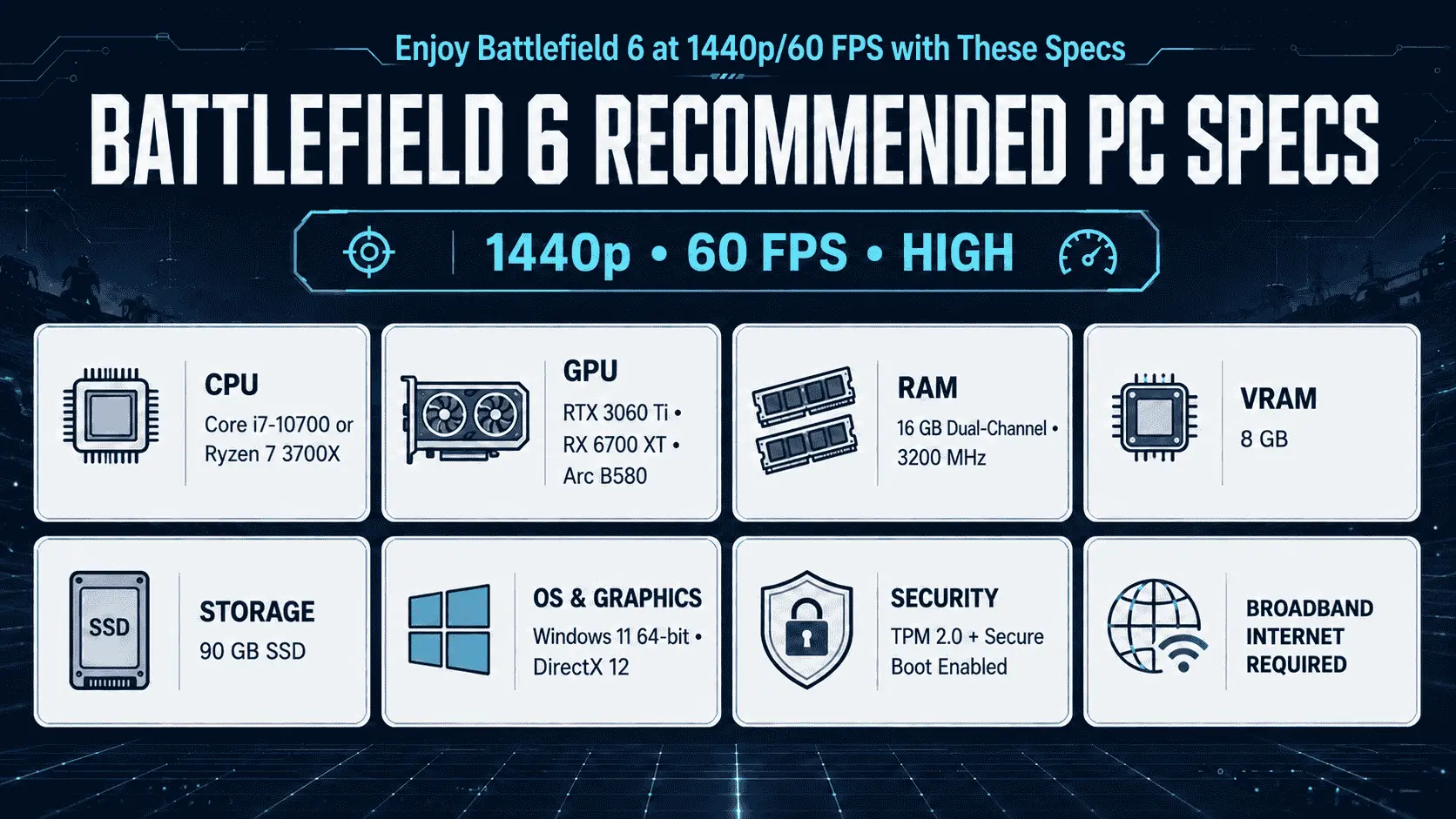
Battlefield 6 system requirements begin with an Intel Core i5-8400 or AMD Ryzen 5 2600, an Nvidia RTX 2060, AMD Radeon RX 5600 XT, or Intel Arc A380, 16GB of dual-channel RAM, and 6GB of VRAM. A PC meets EA’s minimum hardware tier only when every key component reaches that level. These specifications target native 1080p at 30 FPS on Low settings. For native 1440p at 60 FPS on High, or 1080p at more than 80 FPS on Low, EA recommends a Core i7-10700 or Ryzen 7 3700X, an RTX 3060 Ti, RX 6700 XT, or Arc B580, 8GB of VRAM, and 16GB of dual-channel RAM.
Matching the processor and graphics requirements does not guarantee that the game will launch. Battlefield 6 system requirements also involve a 64-bit Windows installation, DirectX 12, an internet connection, TPM 2.0 enabled, UEFI Secure Boot enabled, and a system capable of HVCI and VBS. EA’s final performance chart lists 55GB for the minimum installation and 90GB for the recommended tier, while the current Battlefield 6 FAQ lists 60GB and 90GB. Reserving at least 60GB for a minimum installation or 90GB on an SSD for the recommended tier, plus free space for updates, is the safer approach.
Battlefield 6 System Requirements at a Glance
EA divides the Battlefield 6 system requirements into four tiers. Minimum, Recommended, and Ultra use native rendering for their stated performance targets. Ultra++ uses DLSS Super Resolution and, for its highest target, DLSS Multi Frame Generation.
| Component | Minimum | Recommended | Ultra | Ultra++ |
|---|---|---|---|---|
| Preset | Low | High at 1440p or Low at 1080p | Ultra at 4K or Medium at 1440p | High at 4K/144 FPS or Ultra at 4K/240+ FPS |
| Performance target | 1080p at 30 FPS | 1440p at 60 FPS or 1080p at 80+ FPS | 4K at 60 FPS or 1440p at 144 FPS | 4K at 144 FPS or 4K at 240+ FPS |
| Rendering method | Native | Native | Native | DLSS Super Resolution; Multi Frame Generation for 240+ FPS |
| Intel CPU | Core i5-8400 | Core i7-10700 | Core i9-12900 | Core Ultra 9 285K |
| AMD CPU | Ryzen 5 2600 | Ryzen 7 3700X | Ryzen 7 7800X3D | Ryzen 7 9800X3D |
| NVIDIA GPU | GeForce RTX 2060 | GeForce RTX 3060 Ti | GeForce RTX 4080 | GeForce RTX 5080 |
| AMD GPU | Radeon RX 5600 XT | Radeon RX 6700 XT | Radeon RX 7900 XTX | No official option listed |
| Intel GPU | Arc A380 | Arc B580 | No official option listed | No official option listed |
| RAM | 16 GB dual-channel at 2133 MHz | 16 GB dual-channel at 3200 MHz | 32 GB dual-channel at 4800 MHz | 32 GB dual-channel at 4800 MHz |
| VRAM | 6 GB | 8 GB | 16 GB | 16 GB |
| Operating system | Windows 10 64-bit | Windows 11 64-bit | Windows 11 64-bit | Windows 11 64-bit |
| DirectX | DirectX 12 | DirectX 12 | DirectX 12 | DirectX 12 |
| Storage | 55 GB HDD at launch | 90 GB SSD | 90 GB SSD | 90 GB SSD |
The processors and graphics cards listed within each tier are alternatives. A PC does not need both an Intel and AMD processor or cards from several GPU manufacturers. Every tier also requires a broadband connection, TPM 2.0 enabled, UEFI Secure Boot enabled, and hardware capable of HVCI and VBS. Hardware-Accelerated GPU Scheduling is recommended for the minimum Windows 10 configuration.
A system should be judged by its weakest relevant component. An RTX 3060 Ti paired with an older processor below the minimum requirement does not qualify for the Recommended tier. The same applies to a computer with a strong processor but insufficient VRAM, less than 16GB of RAM, or an unsupported security configuration.
Why does EA list different storage requirements?
EA’s October 2025 performance chart lists 55GB on an HDD for Minimum and 90GB on an SSD for Recommended, Ultra, and Ultra++. The current EA system-requirements page instead lists 55GiB for Minimum and 80GiB for Recommended, while the current FAQ lists 60GB and 90GB.
GB and GiB are different units: 80GiB is approximately 85.9GB. That conversion narrows the difference but does not fully reconcile EA’s figures, and EA does not explain the remaining discrepancy. Reserving at least 60GB for a minimum installation or 90GB on an SSD for the higher tiers is the safer interpretation. Additional free space should remain available because game updates may need storage beyond the final installed size.
Can your PC run Battlefield 6?
A PC meets the official Battlefield 6 minimum only when its processor, graphics card, dedicated VRAM, system RAM, operating system, DirectX support, storage, and security configuration all meet the minimum requirements. The lowest qualifying component determines the suitable performance tier.
Find your exact PC specifications
Windows provides the required hardware information without installing a third-party detection program.
- Press Ctrl + Shift + Esc to open Task Manager, then go to the Performance tab. The CPU page shows the full processor model, while the GPU page shows the graphics card name and dedicated GPU memory. The Memory page reports installed RAM and its current speed. The Disk page identifies the drive as an SSD or HDD.
- Press Windows + R, enter
dxdiag, and select OK. The System tab shows the processor, installed memory, operating system, and DirectX version. The Display tab identifies the active GPU. Use the Display Memory (VRAM) figure when checking graphics memory; the larger approximate total-memory figure may include shared system memory. - Press Windows + R, enter
msinfo32, and open System Summary. Check that BIOS Mode reads UEFI and Secure Boot State reads On. These values affect whether EA Javelin Anticheat will allow Battlefield 6 to launch. - Press Windows + R, enter
tpm.msc, and check the TPM status. It should report that the TPM is ready for use, with Specification Version 2.0 shown in the manufacturer information. - Open Settings > System > Storage to check available space on the intended installation drive. The capacity of the drive is less important than the free space remaining after Windows, other games, and pending updates are accounted for.
Systems with both integrated and dedicated graphics may show two GPUs in Task Manager. The more powerful discrete GPU must be identified separately rather than assuming that GPU 0 or GPU 1 is the card Battlefield 6 will use.
Compare the complete system
Matching one component does not qualify the complete PC for the same tier. Each part must be compared with the corresponding requirement.
| Comparison result | Practical conclusion |
|---|---|
| Every component meets Minimum | Official target: native 1080p, 30 FPS, Low |
| Every component meets Recommended | Official target: native 1440p, 60 FPS, High; or native 1080p, 80+ FPS, Low |
| Components fall across different tiers | Use the lowest matching tier as the starting target |
| One component falls below Minimum | The PC is below EA’s officially supported minimum |
| A component is not listed | Use benchmarks for that exact component under comparable settings; the model name alone is not enough |
A Core i7-10700 paired with an RTX 2060 remains limited to the minimum GPU tier despite meeting the recommended processor requirement. An RTX 3060 Ti paired with only 8GB of system RAM falls below the minimum because Battlefield 6 requires 16GB. A high-end processor also cannot compensate for a graphics card with less than the required 6GB of dedicated VRAM.
Storage and security failures may be correctable without replacing the main hardware. Freeing drive space, moving the game to an SSD, enabling TPM 2.0, or configuring Secure Boot can remove those blockers. A processor or graphics card below minimum requires a hardware upgrade unless verified testing shows acceptable unsupported performance.
Treat desktop and laptop hardware separately
A laptop GPU should not be treated as equal to a desktop card with a similar name. An RTX 3060 Laptop GPU, for example, is not the same product as the desktop RTX 3060 Ti listed in the Recommended tier. Laptop graphics performance depends on core configuration, VRAM, Total Graphics Power, cooling capacity, and the power limit selected by the manufacturer.
Two laptops carrying the same GPU name can deliver different sustained frame rates because one model may provide more GPU power or stronger cooling. Performance can also change when the laptop is running on battery, using a quiet thermal profile, or routing frames through integrated graphics. Comparisons should use the complete laptop model, its stated GPU power limit, and testing performed while connected to its power adapter.
Laptop processors also use different power limits from their desktop counterparts. A newer Core i7 or Ryzen 7 mobile processor is not automatically equivalent to the desktop CPU in EA’s requirements. The full processor model—including suffixes such as H, HX, or U—must be considered.
Do not confuse Intel Arc A380 with integrated graphics
The Intel Arc A380 in the minimum requirements is a discrete graphics card with its own video memory. It does not represent Intel UHD Graphics, Iris Xe, or every processor containing Intel Arc-branded integrated graphics.
Integrated GPUs use part of the computer’s system RAM as graphics memory. Windows may report a large amount of shared GPU memory, but shared memory is not equivalent to the 6GB of dedicated VRAM required by Battlefield 6. Allocating more system memory to an integrated GPU also does not give it the processing performance or memory bandwidth of an Arc A380, RTX 2060, or RX 5600 XT.
EA provides no official integrated-graphics tier. A PC or Windows handheld using an unlisted integrated GPU therefore sits outside the documented requirements, even if the device supports DirectX 12 and allows a large memory allocation. Its suitability must be established through testing of the exact processor, power mode, resolution, graphics preset, and game version. Linux or SteamOS compatibility must also be checked separately because meeting the hardware requirement does not satisfy Battlefield 6’s Windows and anti-cheat requirements.
What controls Battlefield 6 performance?
The processor prepares game data for each frame, while the graphics card renders the completed image. VRAM holds graphics assets, system RAM stores active game and operating-system data, and the storage drive supplies files when they are needed. A limitation in any one of these areas can reduce frame rate, cause stuttering, or prevent the game from loading correctly.
CPU and multiplayer performance
Battlefield 6 places more processor demand on the PC during multiplayer than a controlled campaign scene may reveal. The CPU must process player and vehicle states, physics tasks, destruction, animation, networking data, and draw calls before the GPU can finish each frame. Larger battles and rapidly changing scenes can therefore expose a processor limit that is not visible in a quieter test.
A consistent 60 FPS requires each frame to be prepared and displayed within approximately 16.7 milliseconds. At 144 FPS, the available time falls to about 6.9 milliseconds. A processor may be sufficient for 60 FPS but unable to prepare frames quickly enough for a stable 144 FPS target, even when paired with a powerful graphics card.
Lowering resolution mainly reduces GPU workload. It does not substantially reduce player simulation or other CPU tasks. If frame rate changes very little after moving from 1440p to 1080p or lowering graphics settings, the processor, a frame-rate cap, or another non-GPU limit may be responsible.
Average FPS alone can hide short drops during heavy combat. Frame-time consistency and 1% low performance provide more useful context. The 1% low represents the slower end of recorded frames and helps reveal stutter that may not appear in the average. Campaign GPU benchmarks should not be treated as direct predictions of processor performance in a populated multiplayer match.
GPU, resolution, and VRAM
The graphics card controls how quickly Battlefield 6 can render resolution, lighting, shadows, effects, geometry, and post-processing. Higher resolutions increase the number of pixels produced per frame, while heavier presets increase the work applied to those pixels.
A GPU limit usually becomes visible when reducing resolution or graphics quality produces a clear frame-rate increase. Upscaling can also help because the GPU renders a lower internal resolution before reconstructing the image at the selected output resolution. These changes will have limited effect when the processor is already taking longer than the GPU to prepare each frame.
VRAM capacity determines how much graphics data can remain close to the GPU. EA specifies 6GB for Minimum, 8GB for Recommended, and 16GB for Ultra and Ultra++. When the game requires more graphics memory than the card can provide, some data may be moved through slower system memory. Possible symptoms include frame-time spikes, delayed texture loading, texture-quality reductions, or instability.
Texture quality is closely connected to VRAM use, while resolution, lighting, shadows, and effects place more pressure on GPU processing. Lowering textures can help a VRAM-limited card without reducing image resolution. Lowering resolution or using upscaling is more effective when the GPU lacks rendering performance rather than memory capacity.
RAM capacity, channels, and speed
Battlefield 6 requires 16GB of system RAM for both Minimum and Recommended configurations. Ultra and Ultra++ increase the requirement to 32GB. System RAM is separate from the dedicated VRAM installed on the graphics card; having 32GB of system memory does not satisfy a 16GB VRAM requirement.
EA specifies dual-channel memory for every tier. Dual-channel operation allows the processor to access two memory channels concurrently, increasing available bandwidth compared with an equivalent single-channel configuration. A PC with one 16GB module has the required capacity but may provide less memory bandwidth than two compatible 8GB modules operating in dual-channel mode.
Memory speed also forms part of EA’s configurations: 2133MHz for Minimum, 3200MHz for Recommended, and 4800MHz for Ultra. A memory kit advertised at a higher speed may run at a lower default setting until a supported XMP or EXPO profile is enabled. Task Manager reports the active speed, which is more useful than the number printed on the memory packaging.
When available RAM is exhausted, Windows moves less-active data to the page file on the storage drive. This process is much slower than accessing physical memory and can contribute to stuttering. Closing memory-heavy background applications may help a 16GB system, while 32GB provides more room for the game, voice chat, recording software, browsers, and other active programs.
SSD performance and free space
An HDD remains part of EA’s Minimum configuration, but recommended and higher tiers specify an SSD. Storage speed has less influence on frame rate once all required data is loaded, so replacing an HDD with an SSD will not correct a CPU or GPU bottleneck. It can reduce loading delays and allow assets to be accessed more quickly when the game requests new data.
Free capacity also affects installation and updating. A drive containing the final installed game may still lack enough temporary space to download, unpack, and apply a large update. Windows may also need space for its page file and system operations. Keeping free capacity beyond the stated 60GB or 90GB requirement reduces the chance of failed updates or storage-related interruptions.
Identify the limiting component
| Symptom | Likely limitation | Useful first check |
|---|---|---|
| FPS increases clearly after lowering resolution | GPU rendering performance | Compare GPU load and frame time at both resolutions |
| FPS changes little after lowering resolution or preset | CPU, frame-rate cap, or background process | Remove the cap and compare CPU and GPU frame times |
| Stuttering appears as VRAM use approaches capacity | Graphics-memory pressure | Lower texture quality and check dedicated VRAM use |
| RAM is nearly full while storage activity increases | System-memory pressure and paging | Close background applications and monitor committed memory |
| Loading is slow or assets appear late | Storage performance or insufficient free space | Check drive type, free capacity, and game-file integrity |
| Performance falls after several minutes | Temperature or power limit | Check CPU and GPU temperatures, clock speeds, and laptop power mode |
These symptoms identify likely causes rather than proving a single fault. Driver problems, game updates, thermal limits, background software, and damaged game files can produce similar behaviour, so only one condition should be changed at a time when testing.
Battlefield 6 software and security requirements
Battlefield 6 can refuse to launch on a PC that meets the processor, graphics, memory, and storage requirements. The operating system must support DirectX 12 and the security features required by EA Javelin Anticheat.
Windows 10, Windows 11, and DirectX 12
EA lists 64-bit Windows 10 as the minimum operating system and 64-bit Windows 11 for Recommended, Ultra, and Ultra++. A 32-bit Windows installation is not supported, regardless of the installed hardware.
Windows 10 remains in EA’s minimum specification, but Microsoft ended standard Windows 10 support on October 14, 2025. The operating system continues to work, and EA still lists it as compatible, but routine security updates are no longer provided unless the device qualifies for an Extended Security Updates arrangement. Windows 11 is the more suitable option for a new installation because it remains supported by Microsoft and forms part of every Battlefield 6 tier above Minimum.
DirectX 12 is required across all four tiers. The DirectX version shown in dxdiag confirms the version installed with Windows, while the graphics card must also provide the required hardware support. Installing DirectX 12 does not make an older, unsupported GPU equivalent to an RTX 2060, RX 5600 XT, or Arc A380.
EA recommends enabling Hardware-Accelerated GPU Scheduling for the minimum Windows 10 configuration. This setting allows the GPU to manage more of its own scheduling work, but EA presents it as a recommendation rather than a replacement for any minimum component. Current graphics drivers should also be installed before performance testing because outdated drivers can cause crashes, visual errors, or incorrect game profiles.
Secure Boot, TPM 2.0, HVCI, and VBS
EA uses different wording for the four security requirements, and the distinction matters.
| Security feature | EA requirement | Meaning |
|---|---|---|
| TPM 2.0 | Enabled | The Trusted Platform Module must be active and report specification version 2.0 |
| UEFI Secure Boot | Enabled | The PC must boot in UEFI mode and verify trusted software during startup |
| HVCI | Capable | The system must support Hypervisor-Protected Code Integrity |
| VBS | Capable | The hardware and Windows installation must support Virtualization-Based Security |
Secure Boot allows the firmware to verify trusted boot components before Windows starts. EA Javelin Anticheat uses this trusted startup state to make certain forms of low-level tampering more difficult. A motherboard supporting Secure Boot is not enough; Secure Boot State must report On in Windows.
TPM 2.0 provides hardware-backed security functions used by Windows and platform-security systems. Entering tpm.msc should show that the TPM is ready for use and that its specification version is 2.0. A TPM that exists but remains disabled in the firmware does not meet the requirement.
HVCI is also called Memory Integrity in Windows Security. It uses virtualization to protect kernel-level code from untrusted modification. VBS creates an isolated environment that Windows can use for security operations. EA’s specification says these two features must be capable, whereas TPM 2.0 and Secure Boot must be enabled. “Capable” should not be rewritten as “enabled” unless EA changes its published requirement.
The required values can be checked without entering the firmware:
- Enter
msinfo32in the Windows Run dialog. - Confirm that BIOS Mode reads UEFI.
- Confirm that Secure Boot State reads On.
- Check the Virtualization-based security entry near the bottom of System Summary.
- Open
tpm.mscand confirm that TPM 2.0 is ready. - Open Windows Security > Device security > Core isolation to review Memory Integrity support.
A PC using Legacy BIOS mode or an MBR-formatted Windows system disk may require more than a simple Secure Boot toggle. Moving from Legacy BIOS to UEFI can require disk conversion and firmware changes. Incorrect settings can prevent Windows from starting, so the computer or motherboard manufacturer’s instructions should be followed before changing the boot mode, security keys, or disk-partition format.
Internet, EA Account, and launcher requirements
A broadband internet connection is required to download critical updates and play Battlefield 6. Meeting the offline hardware requirements is therefore insufficient when the PC cannot connect to EA’s services.
The required launcher depends on where the game was purchased. Steam players need an EA Account but do not need the EA app running to launch Battlefield 6. Epic Games Store purchases require both the Epic launcher and EA app, while EA Play Pro access also uses the EA app. An EA Account should be linked to the selected storefront account before the first launch to avoid account-connection errors.
The storefront does not change the game’s CPU, GPU, RAM, VRAM, storage, or security requirements. Standard and Phantom editions also use the same core game requirements; their content differences do not create separate performance tiers.
Battlefield 6 upscaling and frame generation
Battlefield 6 supports Nvidia DLSS 4, AMD FSR 4, and Intel XeSS 2. These technologies can increase performance by reducing the work required to produce the displayed image, but they do not remove the processor, VRAM, system-memory, storage, or security requirements.
DLSS 4, FSR 4, and XeSS 2
DLSS, FSR, and XeSS contain more than one graphics feature. Upscaling reconstructs a higher-resolution output from a lower internal resolution. Frame generation creates additional images between rendered frames. These processes solve different performance problems and should not be treated as the same setting.
| Technology | Main purpose | Hardware consideration |
|---|---|---|
| NVIDIA DLSS 4 | Super Resolution, supported frame-generation features, and image reconstruction | Available on GeForce RTX hardware, but the supported feature set differs by GPU generation |
| AMD FSR 4 | Upscaling and supported frame-generation features | Available options depend on the graphics card, driver, and game implementation |
| Intel XeSS 2 | Upscaling and supported frame-generation features | Feature support differs between Intel Arc and other compatible hardware |
| Native rendering | Renders at the selected output resolution without upscaling | Provides the clearest performance comparison but places the full resolution workload on the GPU |
The presence of DLSS 4 in the graphics menu does not mean that every GeForce RTX card supports Multi Frame Generation. EA’s Ultra++ target pairs that feature with the RTX 5080. The same principle applies to FSR 4 and XeSS 2: the game may support the technology, but the exact GPU and driver determine which options can be enabled.
EA does not provide FSR 4 or XeSS 2 hardware configurations equivalent to Ultra++. Their inclusion in the game confirms feature support, not an official 4K/144 or 4K/240 performance target for Radeon or Arc cards.
Choose an upscaling mode according to resolution
Upscaling modes commonly use labels such as Quality, Balanced, Performance, and Ultra Performance. Quality mode renders at the highest internal resolution of these options, preserving more image detail but providing a smaller performance gain. Performance modes render fewer internal pixels, increasing GPU headroom while making softness, shimmering, disocclusion, and fine-detail loss more likely.
At 1080p, aggressive upscaling starts from a low internal resolution and can make distant players, fences, vegetation, and other fine details harder to resolve. Native rendering or a high-quality upscaling mode is more suitable when the graphics card already produces an acceptable frame rate.
At 1440p, Quality mode provides a higher internal pixel count than it does at 1080p and can offer a more useful balance between clarity and GPU performance. Balanced or Performance mode becomes relevant when the GPU cannot reach the intended refresh rate, but image quality should be checked during movement rather than judged from a static scene.
At 4K, the larger output resolution gives the reconstruction process more display pixels to work with. Upscaling can therefore remove a substantial part of the GPU workload while retaining a 4K output. The result is still reconstructed rather than native, and the image can change between maps, weather conditions, particle-heavy scenes, and rapid camera movement.
The correct mode should be selected through a controlled comparison:
- Disable frame generation and test the chosen resolution at native rendering.
- Record the rendered frame rate, frame-time behaviour, and GPU utilization.
- Enable the highest-quality upscaling mode and repeat the same test.
- Move to a lower-quality mode only if the frame rate remains below the target.
- Stop reducing internal resolution when the loss of clarity becomes more important than the additional FPS.
Upscaling is useful when the graphics card is the limiting component. It provides little benefit when the processor cannot prepare frames quickly enough. A CPU-limited system may show almost the same frame rate at native resolution and with Performance upscaling.
Native FPS and generated FPS are not equivalent
Super Resolution can improve the base frame rate because the GPU renders fewer pixels before reconstructing the output. Frame generation works after that rendered frame has been produced. It creates intermediate images to increase display smoothness, but those generated images do not contain a newly sampled input or newly calculated multiplayer state.
For example, a system producing 50 rendered FPS may display a much higher number after frame generation is enabled. Mouse response and game simulation still begin from the underlying rendered frame rate rather than behaving like the same number of fully rendered frames. The final FPS counter can therefore overstate the improvement in responsiveness.
Frame generation also cannot correct CPU-limited simulation, insufficient VRAM, unstable frame times, or a low base frame rate. When the base performance is inconsistent, generated frames inherit that irregular timing and may make visual artifacts more noticeable around weapon models, interface elements, particles, or rapidly moving objects.
Rendered performance should be measured with frame generation disabled. Frame generation can then be enabled to improve visual smoothness once the base frame rate is stable and responsive enough for the player. Performance comparisons must state whether FPS was measured at native resolution, with upscaling, with frame generation, or with both; results collected under those conditions are not directly interchangeable.
Frequently Asked Questions
Can my PC run Battlefield 6?
Your PC meets EA’s official minimum when it has at least a Core i5-8400 or Ryzen 5 2600, an RTX 2060, RX 5600 XT, or Arc A380, 16GB of dual-channel RAM, 6GB of dedicated VRAM, DirectX 12, and the required Windows security features.
That configuration targets native 1080p at 30 FPS on Low settings.
What are the minimum Battlefield 6 system requirements?
The minimum hardware consists of a Core i5-8400 or Ryzen 5 2600, RTX 2060, RX 5600 XT, or Arc A380, 16GB of dual-channel RAM at 2133MHz, and 6GB of VRAM.
EA lists 64-bit Windows 10, DirectX 12, an internet connection, and approximately 55–60GB of storage.
What are the recommended Battlefield 6 system requirements?
EA recommends a Core i7-10700 or Ryzen 7 3700X, RTX 3060 Ti, RX 6700 XT, or Arc B580, 16GB of dual-channel RAM at 3200MHz, and 8GB of VRAM.
This tier uses Windows 11 and a 90GB SSD to target native 1440p at 60 FPS on High or native 1080p at more than 80 FPS on Low.
Does meeting the minimum requirement mean Battlefield 6 will run at 60 FPS?
No. EA’s minimum configuration targets native 1080p at 30 FPS on Low.
Reaching a consistent 60 FPS requires more CPU and GPU performance than the minimum tier promises.
Can Battlefield 6 run with 8GB of RAM?
Eight gigabytes falls below the official minimum. Windows, background services, EA software, and the game would compete for limited memory, increasing page-file activity and the risk of stuttering or failure to load.
Upgrade to at least 16GB before treating the PC as compatible.
Is 16GB of RAM enough for Battlefield 6?
Sixteen gigabytes meets the Minimum and Recommended requirements. It should be installed in a dual-channel configuration, and unnecessary memory-heavy applications should be closed while playing.
Ultra and Ultra++ officially require 32GB.
Does Battlefield 6 need 32GB of RAM?
Only the Ultra and Ultra++ tiers list 32GB. Players targeting 1080p/30, 1080p/80+, or 1440p/60 do not need 32GB according to EA’s requirements.
Additional memory can help when recording, streaming, or running several background applications.
Is 6GB of VRAM enough for Battlefield 6?
Six gigabytes meets the minimum VRAM requirement for native 1080p at 30 FPS on Low.
It does not meet the 8GB Recommended requirement or the 16GB Ultra requirement. Texture quality and resolution may need to remain limited on a 6GB card.
Can Battlefield 6 run on a 4GB graphics card?
A 4GB graphics card falls below EA’s official 6GB VRAM minimum.
Some unlisted cards may launch with reduced resolution, low textures, or aggressive upscaling, but that does not establish supported or consistent performance across multiplayer maps.
Can a GTX 1650 or GTX 1660 run Battlefield 6?
The GTX 1650 generally has only 4GB of VRAM and falls below the official minimum. A GTX 1660 or 1660 Super may have 6GB, but EA still lists the faster RTX 2060 as its minimum NVIDIA GPU.
Results on these GTX cards should be treated as unsupported and dependent on the exact model, processor, settings, driver, and game update.
Can an RTX 3050 run Battlefield 6?
EA does not list the RTX 3050 in an official tier. An RTX 3050 Laptop GPU with 4GB of VRAM falls below the minimum memory requirement, while an 8GB desktop version meets the VRAM capacity but not necessarily the RTX 2060 performance target.
The exact card should be tested at 1080p Low with frame generation disabled.
Is an RTX 3060 enough for Battlefield 6?
The desktop RTX 3060 is not the RTX 3060 Ti listed in the Recommended tier. Its VRAM capacity may be sufficient, but its rendering performance is lower than the official recommended NVIDIA card.
It should be treated as a configuration between Minimum and Recommended rather than an automatic 1440p/60 High solution.
Can Battlefield 6 run on integrated graphics?
EA provides no official integrated-graphics configuration. The listed Intel Arc A380 is a discrete graphics card, not an Intel integrated GPU.
Shared system memory should not be counted as the 6GB of dedicated VRAM required by the minimum tier.
Can a gaming laptop run Battlefield 6?
A gaming laptop can run Battlefield 6 when its exact mobile CPU, GPU, VRAM, RAM, operating system, and security configuration meet the required level.
Desktop and laptop GPUs with similar names are not equal because laptop performance changes with graphics power limits, cooling, and manufacturer settings.
Can Battlefield 6 run on Steam Deck or SteamOS?
SteamOS does not match EA’s official Windows 10 or Windows 11 requirement, and the game’s Javelin Anticheat depends on Windows security features.
Installing Windows would address the operating-system difference but would not make the Steam Deck’s integrated hardware equivalent to EA’s minimum discrete GPU configuration.
Does Battlefield 6 support Windows 10?
Yes. EA still lists 64-bit Windows 10 as the minimum operating system.
Microsoft’s standard Windows 10 support ended in October 2025, so game compatibility and continued operating-system security support should be treated as separate issues.
Is Windows 11 required for Battlefield 6?
Windows 11 is not required for the Minimum tier, but EA specifies it for Recommended, Ultra, and Ultra++.
Windows 11 is the correct operating-system target for a PC intended to deliver 1440p/60 or higher official performance.
Does Battlefield 6 require TPM 2.0 and Secure Boot?
Yes. TPM 2.0 and UEFI Secure Boot must be enabled.
A motherboard merely supporting these features is not enough if TPM remains disabled or Windows reports Secure Boot State as Off.
Do HVCI and VBS have to be enabled?
EA’s published requirements state that HVCI and VBS must be capable, while TPM 2.0 and Secure Boot must be enabled.
HVCI capability can be reviewed through Core Isolation and Memory Integrity settings, while VBS status appears in Windows System Information.
Why does Battlefield 6 require Secure Boot?
Secure Boot verifies trusted boot software before Windows starts.
EA Javelin Anticheat uses this trusted startup state to make low-level tampering more difficult and improve cheat detection. It is a launch requirement, not a graphics setting.
Is an SSD required for Battlefield 6?
An HDD is listed for the Minimum tier, so an SSD is not an absolute minimum requirement.
EA requires an SSD for Recommended, Ultra, and Ultra++, making an SSD necessary for the official 1440p/60 and higher configurations.
How much storage space does Battlefield 6 need?
EA’s official pages provide different figures. The final performance chart lists 55GB for Minimum and 90GB for higher tiers, while the current FAQ lists 60GB and 90GB.
Reserving at least 60GB for a minimum installation or 90GB on an SSD for higher tiers, plus update space, is the safer choice.
Does Battlefield 6 require an internet connection?
Yes. EA lists a broadband connection as a requirement for critical updates and playing the game.
Hardware compatibility alone is insufficient without access to EA’s online services.
Does the Steam version require the EA app?
The Steam version requires an EA Account but does not require the EA app to launch the game.
Epic Games Store purchases and EA Play Pro access use the EA app. The storefront does not change the game’s hardware requirements.
Does Battlefield 6 require DirectX 12?
Yes. DirectX 12 is required across Minimum, Recommended, Ultra, and Ultra++.
Installing DirectX 12 cannot add missing hardware features to an unsupported graphics card.
Does Battlefield 6 support DLSS, FSR, and XeSS?
Yes. Battlefield 6 supports NVIDIA DLSS 4, AMD FSR 4, and Intel XeSS 2.
The available upscaling and frame-generation options depend on the installed graphics card, its architecture, and the current driver.
Can frame generation make a below-minimum PC compatible?
No. Frame generation cannot enable TPM 2.0, add DirectX support, increase physical VRAM, replace missing system RAM, or correct a weak processor.
It should be enabled only after the PC produces a stable and responsive rendered frame rate.
What hardware is needed for Battlefield 6 at 1080p and 60 FPS?
EA does not publish a dedicated native 1080p/60 tier. Its Minimum tier targets 1080p/30 Low, while Recommended targets 1080p/80+ Low.
Hardware between those tiers may reach 60 FPS, but the result depends on the complete CPU and GPU combination, multiplayer workload, preset, driver, and game version.
What hardware is needed for Battlefield 6 at 1440p and 60 FPS?
EA recommends a Core i7-10700 or Ryzen 7 3700X with an RTX 3060 Ti, RX 6700 XT, or Arc B580, 16GB of dual-channel RAM, and 8GB of VRAM.
This configuration targets native 1440p at 60 FPS on High.
What hardware is needed for 1440p/144 or 4K/60?
Both targets belong to EA’s Ultra tier. The listed configuration uses a Core i9-12900 or Ryzen 7 7800X3D, an RTX 4080 or RX 7900 XTX, 32GB of dual-channel RAM, and 16GB of VRAM.
EA pairs native 1440p/144 with Medium and native 4K/60 with Ultra.
Is Battlefield 6 more CPU-intensive or GPU-intensive?
The limiting component changes with the target. High resolutions and heavier presets place more pressure on the GPU and VRAM, while high multiplayer frame rates demand faster CPU frame preparation.
Lowering resolution helps a GPU limit but provides little benefit when the processor is already the bottleneck.
Why does Battlefield 6 stutter even when my PC meets the requirements?
Meeting a tier does not guarantee stable frame pacing under every condition. VRAM pressure, full system memory, page-file activity, outdated drivers, thermal throttling, background software, shader compilation, damaged files, and demanding multiplayer scenes can cause stutter.
Monitor frame times, temperatures, memory use, and GPU utilization before replacing hardware.
Do the Standard and Phantom editions have different PC requirements?
No. Both editions use the same core game and system requirements.
The Phantom Edition adds content and benefits rather than a separate graphics build or higher hardware tier.
Can Battlefield 6 requirements change after an update?
Yes. Storage use, driver recommendations, security enforcement, and performance can change as patches and seasonal content are released.
The CPU and GPU tier chart remains the official baseline until EA publishes a replacement, but installed size and measured performance should be checked against the current game version.