
Diablo 4 System Requirements | Minimum, Recommended & 4K
The official Diablo 4 system requirements list an Intel Core i5-2500K or AMD FX-8350, a GeForce GTX 660, Radeon R9 280, or Intel Arc A380, and 8GB of RAM as the minimum for Low settings at 30 FPS, using a 1080p output with a 720p render resolution. The recommended specification targets native 1080p, Medium settings, and 60 FPS with a Core i5-4670K or Ryzen 3 1300X, a GTX 970, RX 470, or Arc A750, and 16GB of RAM.
For 1080p at High settings and 60 FPS, Blizzard lists a Core i7-8700K or Ryzen 7 2700X, an RTX 2060, RX 5700 XT, or Arc A770, and 16GB of RAM. The Ultra tier targets 4K at 60 FPS with the same CPU class, an RTX 3080 or RX 6800 XT, and 32GB of RAM. Every tier also requires 64-bit Windows 10 version 1909 or newer, DirectX 12, broadband internet, and an SSD with 90GB of available space.
Diablo 4 system requirements
The official Diablo 4 system requirements published by Blizzard define four performance tiers: Minimum, Medium, High, and Ultra 4K. Each tier connects specific hardware to a resolution, graphics preset, and target frame rate.
Minimum and recommended specs
| Component | Minimum | Medium (Recommended) |
|---|---|---|
| Operating system | 64-bit Windows 10 version 1909 or newer | 64-bit Windows 10 version 1909 or newer |
| Processor | Intel Core i5-2500K or AMD FX-8350 | Intel Core i5-4670K or AMD Ryzen 3 1300X |
| Memory | 8 GB RAM | 16 GB RAM |
| Graphics card | NVIDIA GeForce GTX 660, AMD Radeon R9 280, or Intel Arc A380 | NVIDIA GeForce GTX 970, AMD Radeon RX 470, or Intel Arc A750 |
| DirectX | Version 12 | Version 12 |
| Storage | SSD with 90 GB available | SSD with 90 GB available |
| Internet | Broadband connection | Broadband connection |
| Performance target | 1080p output with 720p render resolution, Low settings, 30 FPS | Native 1080p, Medium settings, 60 FPS |
The minimum specification does not target native 1080p rendering. Diablo IV outputs at 1080p but renders the 3D scene at 720p before scaling it to the selected display resolution. This reduces the number of pixels processed by the GPU, helping older hardware reach the stated 30 FPS target at the cost of image sharpness.
The recommended specification doubles the system memory to 16GB and raises the GPU requirement to GTX 970, RX 470, or Arc A750 level. It targets native 1080p at 60 FPS, although the official target still uses the Medium graphics preset rather than High.
High and Ultra 4K specs
| Component | High | Ultra 4K |
|---|---|---|
| Operating system | 64-bit Windows 10 version 1909 or newer | 64-bit Windows 10 version 1909 or newer |
| Processor | Intel Core i7-8700K or AMD Ryzen 7 2700X | Intel Core i7-8700K or AMD Ryzen 7 2700X |
| Memory | 16 GB RAM | 32 GB RAM |
| Graphics card | NVIDIA GeForce RTX 2060, AMD Radeon RX 5700 XT, or Intel Arc A770 | NVIDIA GeForce RTX 3080 or AMD Radeon RX 6800 XT; an NVIDIA GeForce RTX 40-series GPU supports the complete DLSS 3 feature set |
| DirectX | Version 12 | Version 12 |
| Storage | SSD with 90 GB available | SSD with 90 GB available |
| Internet | Broadband connection | Broadband connection |
| Performance target | Native 1080p, High settings, 60 FPS | Native 4K, Ultra settings, 60 FPS |
The High tier keeps the 16GB memory requirement but uses a faster processor and graphics card to raise image quality at 1080p. Ultra 4K retains the same listed processor class while increasing system memory to 32GB and placing a much heavier demand on the GPU. These targets cover standard rasterized graphics; enabling ray tracing introduces a separate set of hardware requirements.
Do the expansions change the requirements?
As of August 18, 2026, the official Steam listing for Diablo IV: Lord of Hatred repeats the same minimum and recommended specifications, including the 90GB SSD requirement. Lord of Hatred also includes Vessel of Hatred but requires the Diablo IV base game, so it does not run as a separate installation.
The absence of a higher published minimum does not mean every expansion area, seasonal activity, or combat encounter produces an identical workload. The Diablo 4 system requirements define performance targets, but patches, drivers, background applications, and demanding in-game scenes can still affect frame rate and frame pacing.
What do the official targets mean?
The Diablo 4 system requirements describe intended combinations of resolution, graphics quality, and frame rate. They do not guarantee that every area or combat encounter will remain at the stated FPS, because processor load, available memory, drivers, background software, and game updates can change performance.
Minimum means 30 FPS with compromises
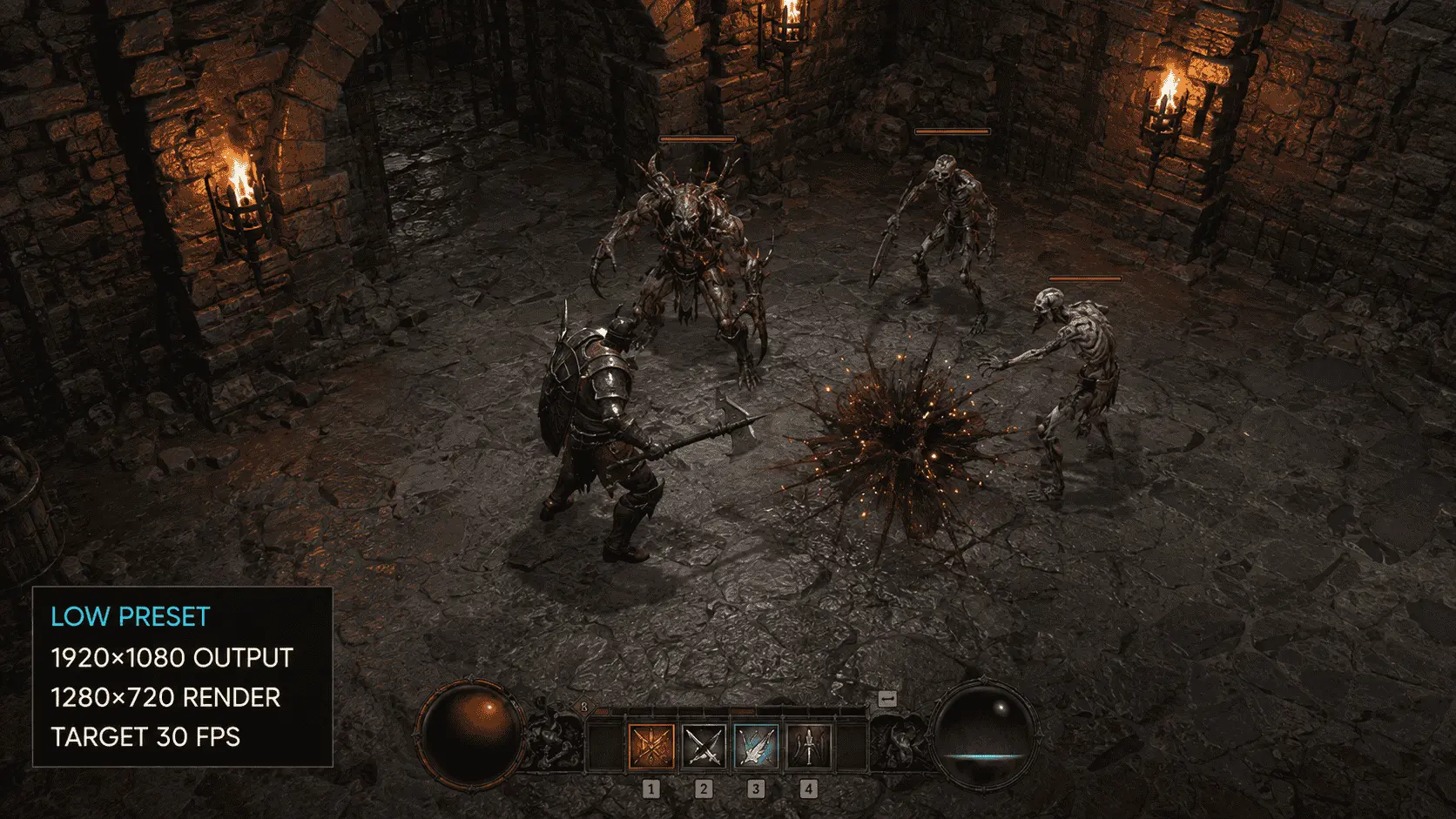
The minimum tier is intended to make Diablo IV playable on older hardware, but its 1080p output should not be mistaken for native 1080p rendering. The game renders the 3D scene at 1280 × 720 and scales it to a 1920 × 1080 output. A 720p frame contains about 922,000 pixels, compared with 2.07 million at 1080p, so the GPU processes roughly 56% fewer pixels before scaling.
That reduction helps a GTX 660, R9 280, or Arc A380 target 30 FPS at the Low preset, but fine details can appear softer. Thirty frames per second also gives the system approximately 33.3 milliseconds to produce each frame. Combat remains playable at that rate, although movement and rapid effects will look less fluid than at 60 FPS.
The 8GB memory requirement refers to total system RAM, not memory reserved for the game. Windows, Battle.net or Steam, security software, voice chat, and other background processes use part of the same capacity. A PC that meets the minimum specifications may therefore have less performance headroom when other applications remain open.
Recommended targets native 1080p at 60 FPS
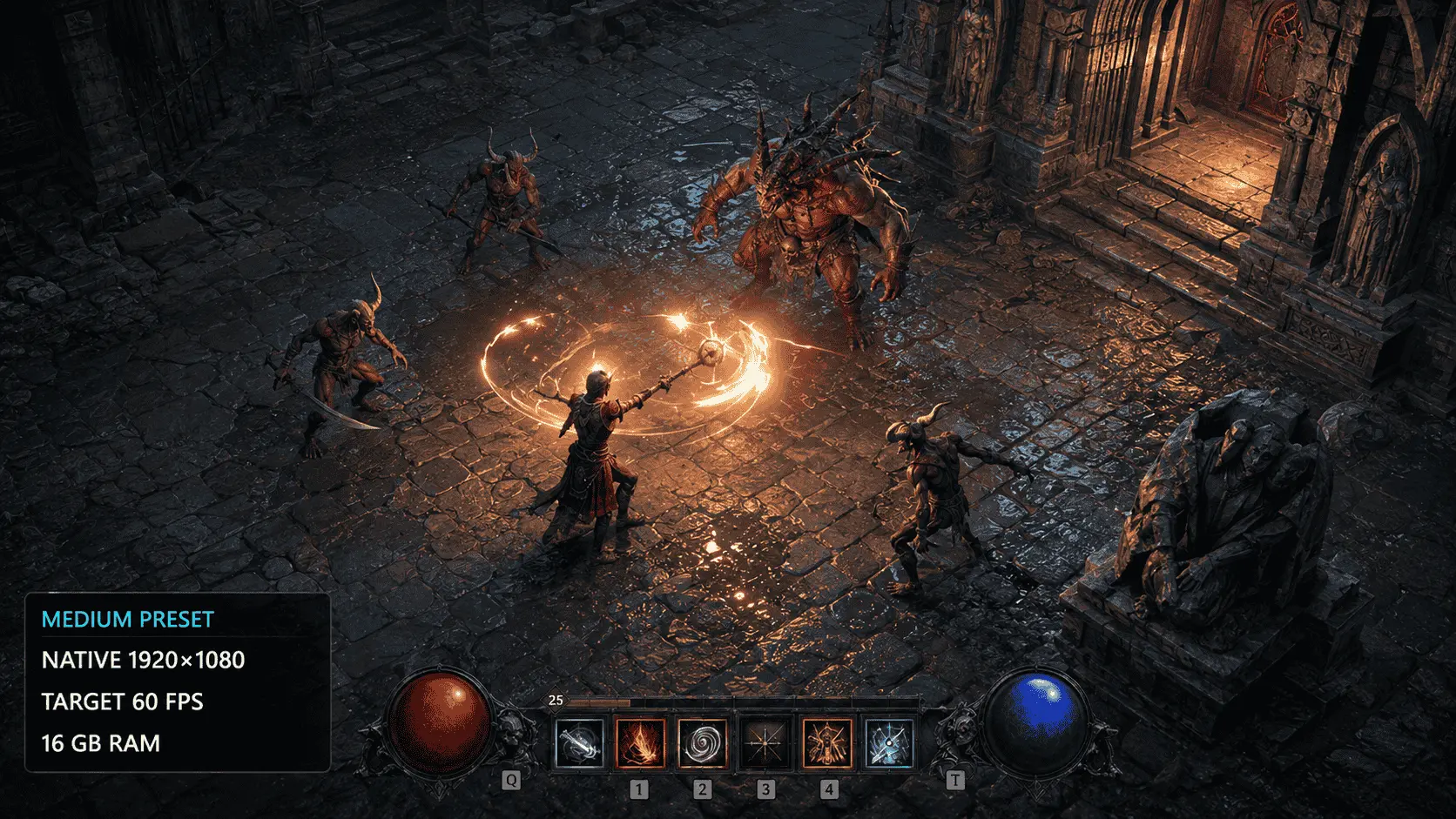
According to Diablo 4 system requirements, the recommended tier raises the target to native 1080p at 60 FPS. Native rendering means the game produces the scene at the monitor’s selected 1920 × 1080 resolution rather than reconstructing it from a lower internal resolution.
Moving from 30 to 60 FPS cuts the available frame time from approximately 33.3 milliseconds to 16.7 milliseconds. The CPU and GPU must complete their work twice as often to maintain that rate. This is why the recommended specification requires a stronger processor, a faster graphics card, and 16GB of RAM rather than simply increasing one component.
Blizzard connects this target to the Medium preset. Meeting the recommended requirements should not be interpreted as an official promise of 1080p at High or Ultra settings. A system may exceed the stated target in less demanding areas, but performance should be evaluated against the exact resolution and preset used.
High and Ultra serve different goals
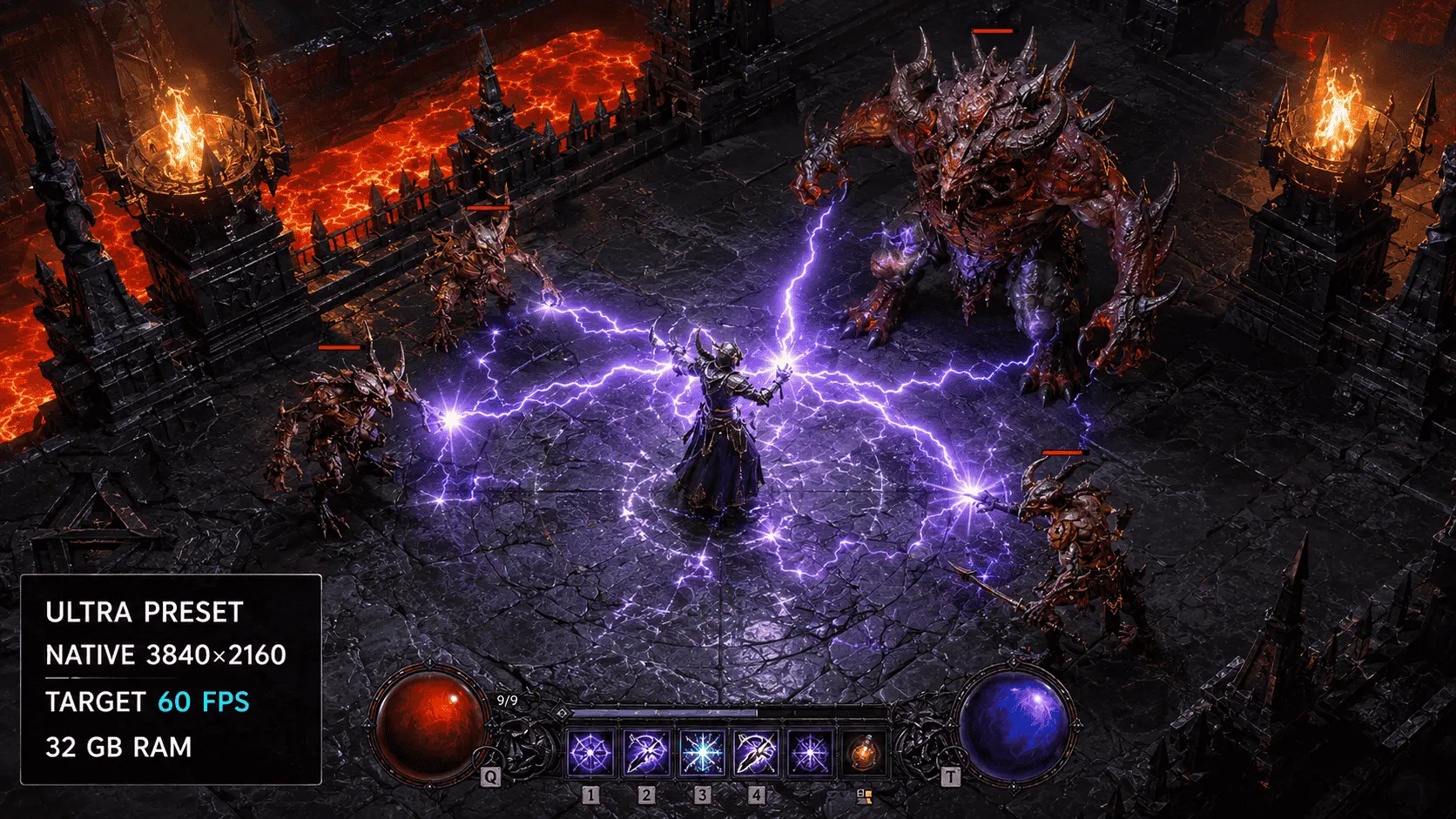
The High tier keeps the resolution at 1080p and the target at 60 FPS while improving graphics quality. Its faster CPU and GPU provide additional processing capacity for the High preset without increasing the number of output pixels.
Ultra 4K changes both image quality and pixel count. A native 3840 × 2160 frame contains about 8.29 million pixels, four times the 2.07 million pixels in a 1080p frame. The RTX 3080 or RX 6800 XT requirement reflects that higher graphics workload, while the increase from 16GB to 32GB of RAM provides more memory capacity for the Ultra configuration.
Blizzard lists the same Core i7-8700K or Ryzen 7 2700X processor class for High and Ultra 4K. This indicates that the official difference between those tiers is centred on GPU and memory demand, but it does not mean the processor becomes irrelevant. Busy towns, dense combat, background applications, and high-refresh-rate targets can still expose a CPU limitation.
There is no standard 1440p tier in Blizzard’s published specifications. A 2560 × 1440 image contains approximately 1.78 times as many pixels as 1080p, so performance cannot be inferred from the High tier alone. A useful 1440p comparison must use the same graphics preset, upscaling mode, ray-tracing state, game version, and target frame rate.
Can your PC run Diablo 4?
A PC should be assessed against the complete hardware tier that matches the intended resolution, graphics preset, and frame rate. Meeting the recommended GPU requirement is not enough if the processor, RAM, operating system, or storage falls below the same tier.
Find your exact PC specifications
- Choose a performance target. Decide whether the goal is 1080p at 60 FPS, 1440p, 4K, or ray tracing. Hardware that is sufficient for 1080p Medium may not provide the same frame rate at a higher resolution or preset.
- Check the processor and system RAM. Open Settings > System > About in Windows. Record the full processor name and installed RAM. A label such as “Core i7” is incomplete because Intel has released many Core i7 generations with different performance levels.
- Identify the active graphics card. Press Ctrl + Shift + Esc, open Task Manager, and select Performance > GPU. Record the complete model name, including terms such as “Ti,” “Super,” or “Laptop GPU.” If the system shows two GPUs, one may be integrated into the processor while the other is the dedicated gaming GPU.
- Check DirectX and graphics memory. Press Windows + R, enter
dxdiag, and open the Display tab. This screen identifies the graphics adapter and reports display memory. Dedicated VRAM should not be confused with shared system memory. - Confirm the Windows version. Press Windows + R, enter
winver, and check the installed version and build. Blizzard lists 64-bit Windows 10 version 1909 or newer in the Diablo 4 system requirements. - Check the storage drive. Open Task Manager and select Performance > Disk to see whether the drive is an SSD or HDD. File Explorer shows how much capacity remains available. Diablo IV requires an SSD with at least 90GB of free space.
Match your PC to the correct tier
For Diablo 4 system requirements, every major component should meet or exceed the same tier. When different parts fall into different categories, the lowest qualifying component provides the safer starting point.
| PC specification | Official performance target | Compatibility assessment |
|---|---|---|
| Below the minimum in one or more major components | No official target | The game may fail to run correctly or may require further reductions |
| Meets the complete minimum tier | 1080p output, 720p render resolution, Low preset, 30 FPS | Suitable only for the minimum published experience |
| Meets the complete recommended tier | Native 1080p, Medium preset, 60 FPS | Appropriate official baseline for 1080p play |
| Meets the complete High tier | Native 1080p, High preset, 60 FPS | Suitable for higher image quality at 1080p |
| Meets the complete Ultra tier | Native 4K, Ultra preset, 60 FPS | Intended for 4K without the separate ray-tracing workload |
For example, a PC with an RTX 2060 and 16GB of RAM does not automatically meet the High tier if its processor is below the listed Core i7-8700K or Ryzen 7 2700X level. The graphics card matches the tier, but the slower processor may limit frame rate during CPU-heavy scenes.
The reverse can also occur. A recent high-performance processor cannot compensate fully for an older graphics card when the resolution or graphics preset creates a GPU-bound workload. Lowering the resolution usually helps in a GPU-limited situation, while it may produce little improvement when the processor is the main restriction.
Compare hardware that Blizzard does not list
The official tables use selected processors and graphics cards as reference points rather than listing every compatible model. Newer or less common hardware should be compared by measured game performance, not by product name alone.
A useful comparison should match these conditions:
- Diablo IV version or patch
- Desktop or laptop graphics card
- Processor and system memory
- Graphics driver version
- Resolution and graphics preset
- Native rendering or upscaling
- Ray tracing enabled or disabled
- Frame Generation enabled or disabled
- Test location and duration
- Average FPS and 1% low FPS
The 1% low represents the performance of the slowest one percent of recorded frames. It provides more information about brief drops and stutter than an average FPS figure alone. Two systems can report the same average frame rate while producing noticeably different frame pacing.
Model numbers should also be read in full. An RTX 4060 Laptop GPU is not automatically equivalent to a desktop RTX 4060, and an integrated Intel GPU is not the same product class as a discrete Intel Arc A380. Power limits, memory configuration, cooling, and driver support can change the result even when two systems use similar product names.
When no matched Diablo IV benchmark is available, compare the unlisted component with the nearest official reference model across several documented gaming tests. A single specification such as core count, clock speed, VRAM capacity, or theoretical processing rate cannot establish complete game performance on its own.
Desktop, laptop, and integrated graphics differences
The processor and graphics-card models in the Diablo 4 system requirements refer to desktop components. A laptop or integrated graphics processor should not be assigned to the same performance tier from its product family or memory figure alone.
Laptop GPUs need separate evaluation
Laptop graphics processors operate within power and cooling limits set by the laptop manufacturer. Two laptops carrying the same GPU name can deliver different sustained performance because their Total Graphics Power, commonly shortened to TGP, cooling systems, and performance profiles are different.
A higher TGP allows a laptop GPU to sustain faster clock speeds when temperature and power conditions permit. A thin laptop may configure the same GPU at a lower power level to control heat, while a larger gaming model may allow it to run faster. The amount of VRAM can remain identical even when the processing performance differs.
CPU performance also varies by laptop design. Mobile processors with U-series, H-series, and HX-series suffixes belong to different power classes, while shared cooling between the CPU and GPU can limit sustained performance during long sessions. Short benchmark runs may therefore produce better results than extended gameplay after the cooling system has reached its normal operating temperature.
A laptop should be checked under the conditions in which Diablo IV will be played:
- Connect the manufacturer-rated power adapter.
- Select the laptop’s performance mode rather than a battery-saving profile.
- Confirm that Diablo IV is using the dedicated GPU.
- Record the exact GPU name and configured TGP when available.
- Compare results from the same laptop model or a closely matched power configuration.
- Test after the system has warmed up, not only during the first few minutes.
Battery operation commonly reduces CPU and GPU power limits. A laptop that meets a target while connected to power may deliver a lower frame rate when unplugged. Display routing can also affect results: some systems send frames from the dedicated GPU through the integrated GPU, while a dedicated-GPU or MUX mode connects the display more directly.
Integrated graphics are not part of an official tier
Blizzard lists Intel Arc A380, A750, and A770 graphics cards in its standard requirements. These are dedicated graphics cards with their own video memory; they are not equivalent to Intel UHD, Iris Xe, or other graphics processors integrated into a CPU.
Integrated graphics normally use part of the computer’s system RAM as graphics memory. Windows may report several gigabytes of shared GPU memory, but that figure is not equivalent to the dedicated VRAM on a discrete graphics card. The CPU and integrated GPU must share memory capacity, bandwidth, cooling, and package power.
Blizzard states that Diablo IV will attempt to run on integrated graphics and other hardware below the minimum specification, but it also warns that the experience may be significantly diminished. “Attempt to run” does not establish a resolution, preset, frame rate, or stability target.
A newer integrated GPU may perform better than an older one, so compatibility should be judged through testing of the exact processor and memory configuration. Dual-channel memory can matter because it gives the integrated GPU more memory bandwidth than a comparable single-channel setup. Driver support and the laptop’s power limit can also change the outcome.
If Diablo IV launches on integrated graphics, the minimum configuration provides the appropriate starting point: Low settings, a reduced render resolution, and a 30 FPS cap. Closing memory-heavy applications and installing the current graphics driver may provide additional headroom, but these steps cannot turn an unsupported configuration into an official performance tier.
HDDs and dual-core CPUs may launch the game
Blizzard applies the same below-minimum caveat to hard drives and dual-core processors. Diablo IV may start on this hardware, but an SSD and the listed processors remain part of the official requirements.
An HDD has much slower access times than an SSD when the game needs many small files. This can increase loading and asset-streaming delays even when the graphics card produces an acceptable average frame rate. Free capacity on an HDD does not satisfy the stated 90GB SSD requirement.
A dual-core CPU may also struggle when the game, Windows, the launcher, networking processes, and background applications require processor time simultaneously. Lowering the display resolution mainly reduces GPU work, so it may not resolve stutter or frame-rate drops caused by a processor limitation.
Below-minimum hardware should therefore be treated as an unsupported attempt rather than a reliable purchasing or installation target. Meeting the complete minimum tier provides the lowest configuration for which Blizzard publishes a defined resolution, preset, and frame-rate goal.
Diablo 4 ray tracing requirements
Ray tracing is not covered by the standard High and Ultra entries in the Diablo 4 system requirements. Blizzard publishes four separate ray-tracing configurations because traced shadows and reflections add GPU, CPU, and memory demands that are absent from the normal rasterized presets.
Low, Medium, High, and Ultra ray tracing specs
The common requirements for all four ray-tracing tiers are 64-bit Windows 10 version 1909 or newer, DirectX 12, broadband internet, and an SSD with 90GB of available space.
| Component | Low ray tracing | Medium ray tracing | High ray tracing | Ultra ray tracing |
|---|---|---|---|---|
| Processor | Intel Core i7-8700K or AMD Ryzen 7 2700X | Intel Core i7-10700 or AMD Ryzen 7 5800X | Intel Core i7-10700 or AMD Ryzen 7 5800X | Intel Core i9-12900 or AMD Ryzen 9 7900X |
| Memory | 16 GB RAM | 16 GB RAM | 32 GB RAM | 32 GB RAM |
| Graphics card | GeForce RTX 2060 with DLSS Super Resolution, Radeon RX 6800 XT, or Intel Arc A770 | DirectX 12-compatible 8 GB GeForce RTX, AMD RDNA 2, or Intel Arc 7-series GPU | GeForce RTX 4060 with DLSS Super Resolution | GeForce RTX 4080 with DLSS Frame Generation |
| Resolution and frame rate | 1080p at 30 FPS | 1080p at 60 FPS | 1080p at 60 FPS | 4K at 60 FPS |
| Ray-tracing configuration | Low reflections, Low shadows, foliage Off, particles Off | Low reflections, Medium shadows, foliage Off, particles On | High reflections, High shadows, foliage Off, particles On | High reflections, High shadows, foliage On, particles On |
The Low ray-tracing tier requires much stronger graphics hardware than the standard 1080p High tier. An RTX 2060 remains the Nvidia reference, but Blizzard lists the considerably faster RX 6800 XT for AMD because ray-tracing performance does not follow the same relationships as standard rasterized performance.
The Medium ray-tracing tier is broader. Blizzard specifies a DirectX 12-compatible graphics card with 8GB of dedicated memory from the GeForce RTX, AMD RDNA 2, or Intel Arc 7 families. This tier targets 1080p at 60 FPS with lower reflection quality and Medium ray-traced shadows.
High ray tracing raises system memory to 32GB and names an RTX 4060 using DLSS Super Resolution. Ultra ray tracing moves to a Core i9-12900 or Ryzen 9 7900X and an RTX 4080 using DLSS Frame Generation. Blizzard does not provide equivalent AMD or Intel recommendations for the High and Ultra ray-tracing tiers, so direct substitutes should be supported by matched performance testing rather than assumed from rasterization results.
What ray tracing changes?
Blizzard added ray tracing to Diablo IV with patch 1.3.5 on March 26, 2024. The company’s official explanation of Diablo IV ray tracing identifies two main effects: ray-traced shadows and ray-traced reflections.
Ray-traced shadows respond more accurately to the position and distance of a light source. A shadow can appear sharper near the object casting it and soften as the distance increases. Higher settings also allow more light sources and objects to contribute to the traced result.
Ray-traced reflections add reflected characters, attacks, environmental objects, and off-screen details to compatible surfaces such as water and pools of blood. Foliage and particle controls determine whether vegetation and effects produced during combat participate in the ray-tracing calculations.
Ambient occlusion and contact shadows were also improved in the same update, but they should not be treated as identical to ray tracing. Ambient occlusion adds shading where objects and surfaces meet, while contact shadows strengthen small shadows close to a character or object. These improvements can remain visible without enabling every ray-tracing option.
Upscaling and Frame Generation are different
DLSS Super Resolution renders the game at a lower internal resolution and reconstructs a higher-resolution output. This reduces the number of pixels the GPU must render directly, which can recover performance consumed by ray tracing. The selected Quality, Balanced, or Performance mode determines how low the internal resolution becomes.
Frame Generation performs a different task. It creates additional frames between conventionally rendered frames. This can increase the displayed FPS, but the generated frames do not process a new player input or advance the game simulation in the same way as a normally rendered frame.
The distinction matters when interpreting the official requirements. An RTX 4060 targeting 1080p with High ray tracing relies on DLSS Super Resolution, while the RTX 4080 target for 4K Ultra ray tracing relies on DLSS Frame Generation. Those results should not be described as native rendering without generated frames.
NVIDIA’s Diablo IV ray-tracing and DLSS documentation reports that DLSS 3 combines Super Resolution, Frame Generation, and Reflex on supported GeForce GPUs. Reflex is intended to reduce system latency, which is useful because a higher generated-frame count does not automatically produce a proportionate improvement in input response.
AMD FSR and Intel XeSS can also reduce internal rendering resolution on compatible hardware, but a performance result obtained with FSR or XeSS should not be presented as equivalent to Blizzard’s named DLSS configuration without a controlled comparison. Image reconstruction methods, modes, and hardware support differ.
Should you enable ray tracing?
Ray tracing is optional and does not affect access to the game’s content. It improves selected shadows and reflective surfaces, but it also increases the work required to render each frame. Its value depends on the display resolution, available GPU performance, and whether the visual change is noticeable during normal play.
Start by testing ray tracing in an area containing water, several light sources, vegetation, and active combat effects. Compare the same scene with ray tracing enabled and disabled while monitoring average FPS, 1% lows, and frame-time consistency. This gives a more useful result than judging the setting from a stationary screenshot alone.
If performance falls below the intended target, reduce or disable ray-traced shadows and reflections before lowering unrelated settings. Turning off traced foliage and particles can also reduce the number of objects included in the calculation. Players who prefer stable input response and consistent frame pacing may find the standard High or Ultra preset more suitable than a lower base frame rate supported by Frame Generation.
The published ray-tracing tiers should be read with their complete conditions. “4K at 60 FPS” in the Ultra ray-tracing specification includes an RTX 4080, 32GB of RAM, a high-end processor, Ultra ray-tracing settings, and DLSS Frame Generation. Removing one of those conditions creates a different performance target.
RAM, VRAM, and storage for Diablo IV
Eight gigabytes of RAM is sufficient only for the minimum Diablo 4 system requirements. Blizzard specifies 16GB for the recommended 1080p/60 FPS configuration and 32GB for Ultra 4K or the higher ray-tracing presets. The game also requires an SSD with 90GB of available space, while its VRAM needs depend on the graphics preset, resolution, ray tracing, and the specific GPU.
Is 8GB of RAM enough?
Yes, but only for Diablo 4’s minimum performance target: Low settings at 30 FPS, with a 1080p output resolution and 720p render resolution. Eight gigabytes leaves limited memory for Windows, Battle.net, or Steam, voice chat, browser tabs, recording software, and overlays. If physical memory fills, Windows may move data to the page file on the SSD, which is much slower than RAM and can contribute to stuttering or inconsistent frame delivery.
Players targeting 1080p at 60 FPS should treat 16GB as the practical baseline because that is the amount specified in the recommended Diablo 4 system requirements. Closing unnecessary background applications can help an 8GB system, but it does not turn that configuration into an equivalent of 16GB.
A 32GB configuration becomes relevant at the official Ultra 4K tier and for High or Ultra ray tracing. Installing more than 32GB will not automatically increase frame rates unless the system was already running out of memory or is handling demanding background workloads alongside the game.
How much VRAM does Diablo 4 need?
Blizzard does not publish one universal VRAM requirement for every graphics mode. Instead, most tiers identify complete GPU models because video-memory capacity alone does not determine performance. GPU architecture, processing power, memory bandwidth, drivers, resolution, and graphics settings also affect whether a card can sustain the intended frame rate.
VRAM stores resources such as textures, render targets, geometry data, and graphics buffers. Higher resolutions and texture settings increase memory use, while ray tracing adds further acceleration structures and rendering data. Blizzard explicitly specifies a DirectX 12-compatible GPU with 8GB of memory for the Medium ray-tracing target, but that does not mean every 8GB graphics card will achieve the same result.
Running beyond a GPU’s practical VRAM capacity may lead to texture swapping, delayed asset loading, reduced texture quality, or frame-time spikes. The amount reported as “allocated” by a monitoring tool may also include memory the game has reserved rather than memory it is actively using, so that number should not be interpreted as a precise minimum. The most reliable comparison uses the exact desktop or laptop GPU model at the intended resolution, preset, and ray-tracing setting.
Why does the 90GB SSD figure need headroom?
The official Diablo 4 system requirements call for an SSD with 90GB of available space. “Available space” refers to free capacity, not the SSD’s total advertised size, and it should not be treated as an exact download-size estimate. Download compression, installed files, language data, expansions, and later updates can make the transferred and occupied amounts differ.
Leaving additional free space is important because game updates may need temporary room to download, unpack, verify, or replace existing files. Windows may also need space for updates, temporary files, and the page file. A drive showing exactly 90GB free could therefore satisfy the listed figure yet still create problems during a large patch.
Blizzard specifies an SSD but does not state that an NVMe model is mandatory. A SATA SSD therefore meets the published storage wording, although an NVMe drive can provide higher transfer speeds on compatible systems. An HDD with sufficient capacity does not meet the official SSD requirement. Before installing or updating, check the current size reported by Battle.net or Steam because expansions and content updates can change the required space.
Windows, DirectX, drivers, and internet requirements
As of August 2026, Blizzard’s official Diablo 4 system requirements specify 64-bit Windows 10 version 1909 or newer, DirectX 12, and a broadband internet connection across every performance tier. These are functional requirements: a PC can exceed the recommended CPU, GPU, and RAM specifications but still encounter launch or connection problems if its operating system, graphics driver, or network does not meet them.
Does Diablo 4 run on Windows 11?
Yes. Diablo 4 runs on 64-bit Windows 11 when the rest of the hardware meets the required performance tier. Blizzard’s wording starts at Windows 10 version 1909, but this should be treated as the minimum operating-system boundary rather than a recommendation to install that old Windows build.
The published Diablo 4 system requirements do not cover 32-bit Windows, macOS, or Linux. Compatibility layers may allow the game to run on some Linux-based systems, but those configurations fall outside Blizzard’s official Windows requirements and may be affected by launcher, driver, or update changes.
To check the Windows version, pressWindows key + R, enter winver, and select OK. The result should identify Windows 10 version 1909 or a later 64-bit release. The system type can also be checked under Settings > System > About. Keeping Windows updated reduces the risk of missing DirectX components, security fixes, and platform changes required by newer graphics drivers.
How to check DirectX 12 support
DirectX 12 is required for Diablo 4 and cannot be replaced by selecting a DirectX 11 mode. DirectX is the graphics application programming interface that allows the game to communicate with the GPU and its driver.
PressWindows key + R, enter dxdiag, and open the System tab to check the installed DirectX version. A result showing DirectX 12 confirms that the operating system includes the DirectX 12 runtime, but it does not prove that the graphics card meets Diablo 4’s complete requirements.
The Display tab identifies the active GPU and lists its supported feature levels. Compare the exact GPU model with Blizzard’s minimum, recommended, High, Ultra 4K, or ray-tracing specifications. This distinction matters on systems where Windows reports DirectX 12, but the installed GPU lacks the performance or hardware features needed for the selected graphics mode.
Ray tracing has separate requirements. A GPU that can run the standard DirectX 12 renderer may not support hardware-accelerated ray tracing. The graphics card must also meet Blizzard’s ray-tracing tier for the intended resolution, preset, and frame-rate target.
Which graphics driver should you use?
Use a current stable graphics driver supplied by NVIDIA, AMD, or Intel for the exact GPU model. Graphics drivers contain game-specific compatibility fixes and support for features such as DLSS, FSR, XeSS, frame generation, and ray tracing. Updating a driver can resolve crashes, rendering errors, or missing graphics options, but it does not guarantee a higher average frame rate on every system.
Laptop owners should also check the support page of the laptop manufacturer. Manufacturer-provided drivers may include changes for switchable graphics, display controls, and power management. A newer generic GPU driver can provide later game fixes, while the laptop manufacturer’s package may offer better integration with that particular model.
A clean driver installation is not required for every update. It is more appropriate when a normal update fails, the game detects the wrong GPU, or graphics problems continue after the driver has been updated. On laptops with integrated and dedicated graphics, confirm through Windows Graphics settings or the GPU control panel that Diablo 4 is assigned to the high-performance GPU.
Can Diablo 4 be played offline?
No. Diablo 4 requires an internet connection even when playing without a party. The official Diablo 4 Steam listing specifies a broadband connection and requires a Battle.net account. Buying the Steam edition does not remove the Battle.net account or online connection requirement.
The connection is used for account authentication, character data, the shared game world, and online services. A server outage, maintenance period, or local connection failure can therefore prevent play even if the game is installed and the PC meets every hardware requirement.
Blizzard does not publish a minimum connection speed in megabits per second. Connection stability, latency, and packet loss matter more during play than peak download speed. Limited bandwidth mainly increases installation and update times, while unstable Wi-Fi can cause delayed actions, rubber-banding, or disconnections. An Ethernet connection can reduce wireless interference, though it cannot correct congestion or routing problems outside the home network.
Which PC component should you upgrade first?
Upgrade the component that prevents your PC from meeting the Diablo 4 system requirements for your chosen resolution and graphics preset. A system still using an HDD or limited to 8GB of RAM should address those weaknesses before buying a faster graphics card. Once the SSD and memory requirements are covered, the GPU usually provides the largest improvement to resolution, graphics quality, and ray tracing. Replace the CPU only when its specifications or measured behaviour show that it is limiting performance.
| Current problem | First action | Expected benefit |
|---|---|---|
| Diablo 4 is installed on an HDD | Move the game to an SSD | Faster loading and more consistent asset streaming |
| The PC has only 8 GB of RAM | Upgrade to at least 16 GB | More memory for the game, Windows, and background applications |
| Lowering resolution improves FPS considerably | Upgrade the GPU | Higher frame rates or better graphics settings |
| GPU usage remains low while FPS is limited | Investigate the CPU, memory, and cooling | Identifies a CPU or system-level bottleneck |
| Ray tracing or 4K is the target | Compare the GPU and RAM with the relevant official tier | Prevents upgrading only one part of an underpowered configuration |
| The PC meets the intended tier but performs poorly | Check settings, drivers, temperatures, and background tasks first | May resolve the problem without replacing hardware |
Upgrade the SSD or RAM when below the baseline
An SSD should be the first upgrade if Diablo 4 is installed on a mechanical hard drive. Blizzard includes an SSD in every official performance tier, from the 30 FPS minimum configuration to Ultra 4K. Moving to an SSD will not necessarily raise the average frame rate, but it can reduce loading times and delays associated with retrieving game data.
Check the available connection before buying a drive. A 2.5-inch SATA SSD can satisfy the published requirement when an M.2 slot is unavailable. An NVMe SSD requires a compatible M.2 slot and may operate at different PCIe speeds depending on the motherboard and processor.
Memory should take priority when the PC has only 8GB, and the target is 1080p at 60 FPS. Blizzard specifies 16GB for Medium and High settings, while its Ultra 4K and higher ray-tracing configurations call for 32GB. A matched two-module memory configuration can also provide more memory bandwidth than a single module, provided the motherboard and processor support dual-channel operation.
Before buying RAM, confirm the required DDR generation, supported speed, available slots, and maximum motherboard capacity. DDR4 and DDR5 are physically and electrically incompatible. Laptop memory may use replaceable SO-DIMM modules, soldered chips, or a combination of both.
Upgrade the GPU for higher settings and resolution
The graphics card should be the main upgrade when reducing resolution, texture quality, shadows, or ray tracing produces a clear frame-rate improvement. That behaviour indicates that graphics processing is the main constraint.
GPU requirements rise quickly between Diablo 4’s official tiers. The minimum configuration lists a GeForce GTX 660, Radeon R9 280, or Intel Arc A380, while the Ultra 4K target moves to a GeForce RTX 3080 or Radeon RX 6800 XT. Ray tracing places further demands on GPU processing power and video memory.
Choose a graphics card for the intended output rather than buying solely by model age or VRAM capacity. A card suited to 1080p without ray tracing may not provide acceptable 1440p or 4K performance. Upscaling can reduce the internal rendering workload, but it does not make an entry-level GPU equivalent to the hardware listed for a higher official tier. A desktop GPU upgrade also requires checks beyond performance:
- Confirm that the power supply provides sufficient capacity and the required power connectors.
- Measure the case clearance for card length, height, and thickness.
- Check that nearby expansion cards or drive cages will not block airflow.
- Confirm that the monitor has a compatible display connection.
- Account for the processor, since a much faster GPU can remain underused when paired with a limiting CPU.
Laptop GPUs are normally soldered to the motherboard and cannot be replaced. An external GPU is possible only on laptops with a suitable high-bandwidth connection, and its cost and performance losses often make it a poor upgrade for Diablo 4.
Upgrade the CPU only when it is the limiting component
A CPU upgrade is justified when the processor falls below the intended Diablo 4 tier or monitoring shows that it cannot prepare frames fast enough for the GPU. Possible signs include low GPU usage, limited frame rates that barely change after reducing resolution, or frame-time spikes during processor-heavy scenes.
Overall CPU utilisation can be misleading because a game may be limited by one or two heavily loaded threads while the remaining cores are less active. Check per-core activity, CPU clock speeds, temperatures, and GPU usage during the same repeatable gameplay sequence. Lowering the resolution without changing the frame rate strengthens the case for a CPU limit, but background applications, thermal throttling, memory configuration, or an FPS cap should be ruled out first.
Replacing a CPU can require a compatible motherboard socket, BIOS update, cooler, and different memory. The total platform cost may therefore be higher than the processor price alone. If the existing CPU already meets the recommended tier and the GPU is operating near full capacity, spending the budget on the graphics card will usually produce a clearer gaming improvement.
Rule out software and thermal problems before buying hardware
A PC that meets the relevant Diablo 4 system requirements should be checked for configuration problems before any upgrade. Confirm that the game uses the dedicated GPU, install a stable graphics driver, remove unintended frame caps, and compare performance with ray tracing disabled. Background recording tools, browser processes, overlays, and security scans can also consume CPU time or memory.
Monitor component temperatures and clock speeds during play. A processor or graphics card that reduces its clock speed because of heat can perform below its model’s expected level. Cleaning blocked vents, correcting fan operation, or improving case airflow may restore performance without replacing the component.
The final upgrade decision should be based on the intended resolution, preset, and frame-rate target together with observed system behaviour. Meeting only the minimum specification is enough for the minimum target; it is not evidence that the PC should deliver 60 FPS, High settings, 4K output, or ray tracing.
Frequently Asked Questions
Can my PC run Diablo 4?
Your PC should run Diablo 4 if it has at least a Core i5-2500K or FX-8350 processor, 8 GB of RAM, a GeForce GTX 660, Radeon R9 280, or Intel Arc A380 graphics card, DirectX 12, and an SSD with 90 GB free.
This configuration targets Low settings at 30 FPS with a 720p internal render resolution displayed at 1080p.
Is 8 GB of RAM enough for Diablo 4?
Eight gigabytes meets Blizzard’s minimum requirement, but it is intended for the lowest official performance tier. Windows, launchers, browsers, overlays, and voice-chat software also use system memory.
Aim for 16 GB if you want the recommended 1080p/60 FPS experience. The official Ultra 4K and higher ray-tracing tiers require 32 GB.
What PC specifications are recommended for 1080p at 60 FPS?
Blizzard’s recommended 1080p/60 FPS configuration uses a Core i5-4670K or Ryzen 3 1300X, 16 GB of RAM, and a GeForce GTX 970, Radeon RX 470, or Intel Arc A750.
It also requires DirectX 12 and an SSD with 90 GB of available space. This tier targets Medium graphics settings rather than High or Ultra.
Does Diablo 4 require an SSD?
Yes. An SSD is included in every official Diablo 4 system requirements tier.
Blizzard states that the game may attempt to run from an HDD, but the experience can be considerably reduced. An HDD therefore falls below the published storage requirement even when it has enough free capacity.
How much storage space does Diablo 4 need?
Diablo 4 requires 90 GB of available SSD space. The figure refers to free capacity rather than the drive’s total size.
Leave additional space for game updates, temporary installation files, Windows updates, and the page file. Check the current size shown in Battle.net or Steam before downloading because installed content can change after updates.
Can Diablo 4 run without a dedicated graphics card?
Blizzard states that Diablo 4 may attempt to run on integrated graphics, but integrated GPUs are below its official minimum specification.
Successful launch does not guarantee stable or acceptable performance. Compare the exact integrated GPU with the listed minimum graphics cards, and account for shared system memory and laptop power limits.
Does Diablo 4 work on Windows 11?
Yes, Diablo 4 works on 64-bit Windows 11 when the processor, graphics card, memory, and storage meet the required tier.
Blizzard lists 64-bit Windows 10 version 1909 or newer as its operating-system baseline. Keep Windows and the graphics driver updated before troubleshooting crashes or missing graphics options.
Can Diablo 4 be played offline?
No. Diablo 4 requires a broadband internet connection, including when playing without a party. A Battle.net account is also required for the Steam edition.
Connection loss, account-service problems, or server maintenance can prevent access even when the game is installed locally.
Does Diablo 4 require an RTX graphics card?
No. An RTX graphics card is not required for the standard renderer. Blizzard’s base requirements include older GeForce GTX cards, AMD Radeon cards, and supported Intel Arc GPUs.
Hardware ray tracing is optional and has separate GPU requirements. DLSS Frame Generation also requires supported GeForce RTX hardware and should not be treated as part of the minimum configuration.
What are the Diablo 4 requirements for 4K at 60 FPS?
Blizzard’s Ultra 4K tier specifies a Core i7-8700K or Ryzen 7 2700X, 32 GB of RAM, and a GeForce RTX 3080 or Radeon RX 6800 XT.
It targets 4K resolution, Ultra settings, and 60 FPS without defining one fixed upscaling condition for every GPU. Ray tracing adds a separate workload and may require stronger hardware or reduced settings.
Can Diablo 4 run at 1440p?
Yes, but Blizzard does not publish a separate standard 1440p performance tier.
The required hardware will fall between the High 1080p and Ultra 4K configurations, depending on the preset and frame-rate target. A graphics card above the High-tier models provides more headroom, while upscaling can reduce the internal rendering load.
Is Diablo 4 supported on macOS?
No native macOS version is included in Blizzard’s official Diablo 4 system requirements.
Methods that use compatibility software or another operating system are outside the supported Windows configuration. Launcher updates, graphics-driver limitations, or game patches may affect those unofficial setups.